Fiverr SEO tool for gig SEO and keyword rank tracking

Seller OS is a local-first Chrome extension that helps active Fiverr sellers turn search intent into better gigs. It supports keyword research, gig copy, live gig audits, pricing context, and keyword rank tracking, then stops and lets you approve every change. Nothing sends, saves, or publishes on its own.

Free plan available. No credit card for Free. Local-first data. Human review on every action. Now live on the Chrome Web Store.

Seller OS keyword rank tracking view showing tracked Fiverr keywords, current position, and movement over time
Tracked keywords, positions, and movement in the ranking view.
Keyword researchGig copy draftingLive gig auditsPricing contextKeyword rank tracking

What is a Fiverr SEO tool?

A Fiverr SEO tool supports the work that makes a gig findable: choosing keywords buyers actually search, writing a title, tags, and description that match that intent, and watching where the gig ranks over time. It does not replace your judgement; it shortens the research and drafting steps around it.

Keyword and intent research

Seller OS suggests keywords to track from your own gig and search context, and it can pull in Seller Plus and AI keyword suggestions when they are available. You choose which terms matter, so tracking stays tied to the services you actually sell instead of a generic list.

Gig copy that matches the search

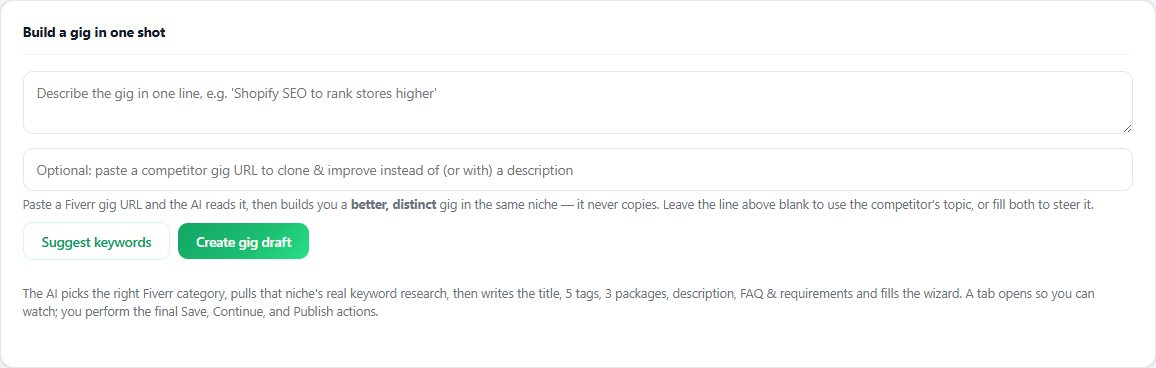
Once the intent is clear, the one-shot Gig Builder turns a one-line idea or a competitor URL into a structured draft: category, title, tags, packages, description, FAQ, and requirements. It fills the Fiverr wizard step by step while you watch, and you complete Save, Continue, and Publish yourself.

Audits and rank tracking over time

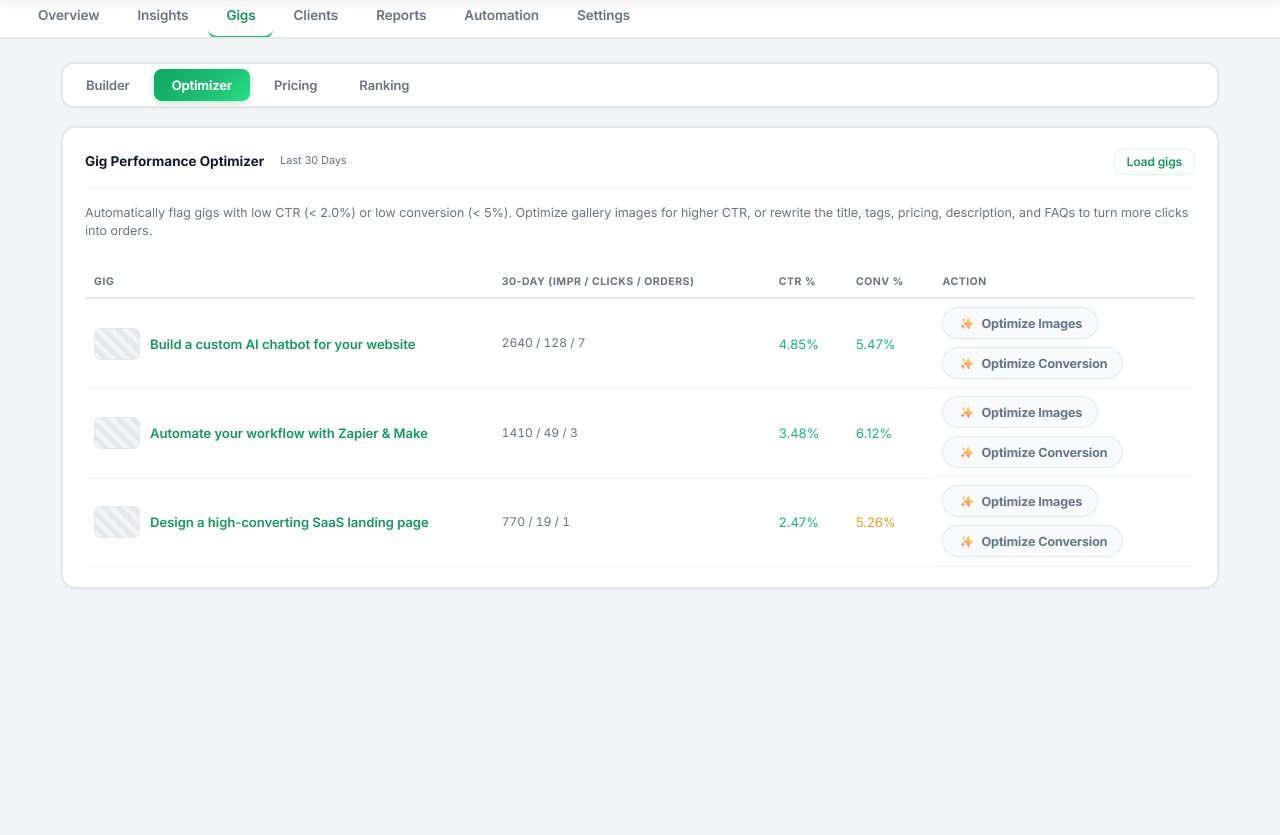
The Gig Performance Optimizer audits a live gig against its own performance data and proposes sharper copy, gallery ideas, and conversion fixes. Keyword rank tracking keeps a position history for the terms you follow, and a Pro monitor can check ranks on a schedule so you can see movement instead of guessing.

Rank tracking without Seller Plus

Fiverr's own advanced analytics and keyword views are part of its paid Seller Plus program when available. Seller OS does not replace them: it tracks the keyword positions you choose by storing the snapshots you collect, keeps the history locally, and can schedule Pro monitor checks while Chrome is open. Snapshots vary by time, account, and location, so treat them as directional evidence, not absolute truth.

Fiverr's field limits are concrete: an 80-character gig title, five search tags of up to 20 characters each, a 1,200-character description, and a 600-character profile bio. The free Fiverr character counter checks all of them in the browser, and the Fiverr seller tools guide explains how keyword research, gig copy, rank tracking, and monitoring fit together.

Seller OS vs the manual Fiverr SEO routine

The same five jobs, done by hand versus done with the extension. Prices are exact: the Free plan is $0, Pro Monthly is $12 per month, and Lifetime is $99 one time.

Manual Fiverr SEO compared with Seller OS
SEO jobDoing it by handWith Seller OS
Pick keywords to targetSearch Fiverr, read autocomplete, keep notesSuggests keywords from your gig and search context; you choose which to track
Write title, tags, and descriptionEdit each field on Fiverr and hope the limits holdGig Builder drafts the structure and fills the wizard against Fiverr's field limits
Audit a live gigCompare your numbers to competitors by handReviews the gig against its own impressions, clicks, and conversions
Track keyword rankSearch Fiverr yourself and note the positionKeeps per-keyword history; a Pro monitor can check on a schedule
CostYour timeFree plan; $12 per month or $99 one time for Pro (AI provider separate)

The Seller OS rule: fill the fields, show the reasoning, and stop before the final click. Every Send, Save, Continue, and Publish stays a human action.

A practical Fiverr SEO workflow with Seller OS

This is the loop the extension is built for. Each step leaves the final decision with you, so a search-driven change only goes live when you approve it.

  1. Find the keywords

    Use keyword suggestions from your own gigs, Seller Plus, and AI to pick the terms buyers search, then add the ones you want to follow.

  2. Draft or rewrite the gig

    Build a new gig from an idea or competitor URL, or have the optimizer propose a new title, tags, description, and FAQ for an existing gig.

  3. Audit against real performance

    Review the audit next to your gig's own impressions, clicks, and conversion data, and keep only the changes that fit the service you deliver.

  4. Review and publish yourself

    Seller OS fills the fields. You press Save, Continue, or Publish on Fiverr, so nothing changes without your approval.

  5. Track rank and adjust

    Follow keyword positions over time, watch for movement, and repeat the loop when a term slips or a new service takes off.

What Seller OS does not promise

SEO advice is easy to oversell, so here is the honest boundary of what this tool does.

See the Fiverr SEO tools in the interface

These are the real Seller OS views that carry the SEO work: building a gig, auditing a live gig, and following keyword positions. Screenshots use synthetic demonstration data; no customer or buyer records are shown.

Gig Builder for new gigs

Describe the service in one line, or paste a competitor URL to position against it. Seller OS structures the draft and fills the wizard, leaving the final steps to you.

  • Category, keyword, and package structure drafted
  • You complete Save, Continue, and Publish
Seller OS gig builder form with an idea field, competitor URL field, and keyword suggestion controls
One idea in, a structured gig draft out, wizard filled for review.

Gig Performance Optimizer

Audit a live gig against its own performance data, then apply sharper titles, tags, descriptions, gallery concepts, and conversion fixes. Every apply keeps history and leaves the final save on Fiverr to you.

  • Copy, gallery, and conversion recommendations
  • Change history with human-controlled applies
Seller OS gig performance optimizer audit view for a live gig with recommendation areas
Audit first, then apply only what earns its place.

Pricing and rank tracking

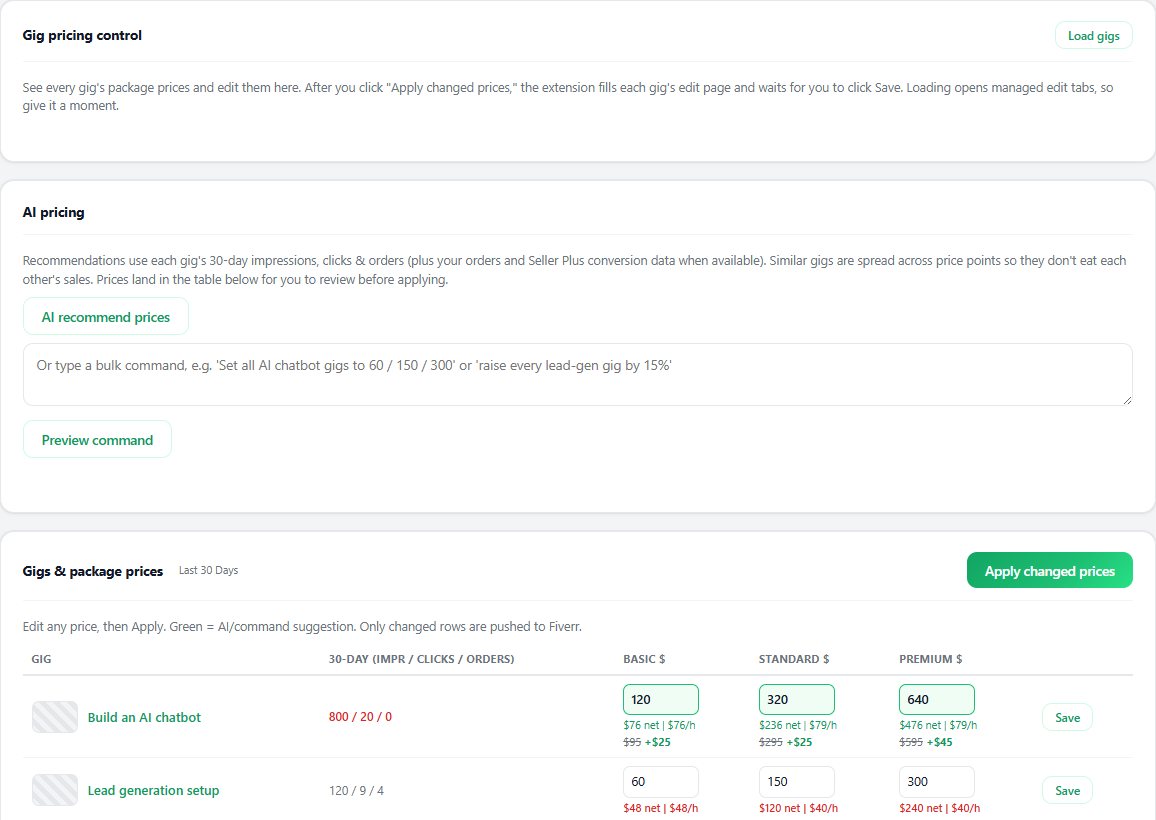
Review package prices against profit assumptions, and follow keyword positions and competitor moves over time. Stale snapshots never overwrite your recently applied prices.

  • Package pricing review with guardrails
  • Keyword rank history and competitor tracking
Seller OS gig pricing view listing package prices with profit assumptions and recommendations
Pricing review with profit assumptions.
Seller OS keyword rank tracking view showing position history and weekly movement for tracked Fiverr keywords
Rank tracking with movement over time.

Fiverr SEO questions

Is Seller OS a Fiverr SEO tool or a general SEO suite?

It is built for Fiverr sellers, not for ranking a separate website. It focuses on gig keywords, gig copy, live gig audits, pricing context, and keyword rank tracking inside the Fiverr workflow you already use. For the broader workspace, see the Seller OS product tour.

Can Seller OS rank my gig for me?

No, and it does not claim to. It helps you research keywords, position a gig to match buyer intent, and track position over time. Fiverr's own search systems decide ranking, so treat every change as a well-informed experiment you approve.

Does it edit my live gig automatically?

No. The Gig Builder fills the wizard and the optimizer proposes edits, but you perform Save, Continue, and Publish on Fiverr. That human gate is deliberate and applies to every gig change.

How does keyword rank tracking work?

You pick the keywords to follow, and Seller OS keeps a position history and shows movement. A Pro monitor can check ranks on a schedule while Chrome is open. Snapshots come from the searches performed and can vary by time, account, and location.

Do I need Seller Plus?

No. Seller OS works without it. When Seller Plus or your own analytics data is available, keyword and performance signals can be richer; when it is not, the tools fall back to the data they can read from the pages you visit.

Where does my data go?

Business snapshots and settings stay in Chrome local storage. Only the content needed for an AI request you start goes to the provider you choose, and the license service never receives Fiverr conversations or analytics. Read the Privacy Policy for details.

What does it cost?

There is a Free plan with limited daily inbox, brief, and gig actions. Pro Monthly is $12 per month, and Lifetime is $99 one time. Both paid plans unlock Seller OS features and monitors; AI provider accounts and credits are separate. See pricing and the Refund Policy.

Get Fiverr SEO tips and Seller OS updates.

Confirm your email to receive product updates, workflow ideas, and occasional Pro offers. Unsubscribe whenever you want.

We store your address encrypted and never sell it. See our Privacy Policy.

Start free and improve your gigs with proof.

Research keywords, draft and audit gigs, and track rank, with every change reviewed by you.