 Seller OS
Fiverr seller tools for gig SEO and day-to-day selling
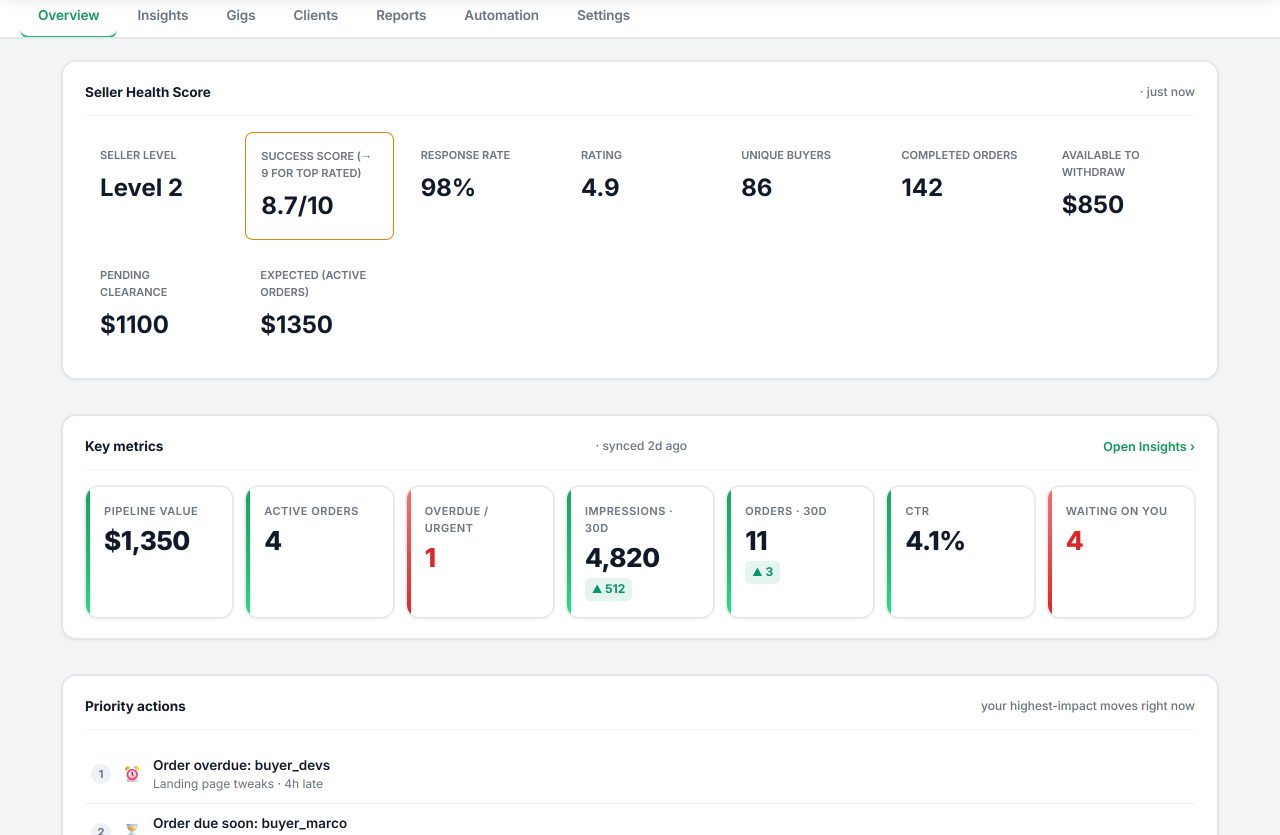
A Fiverr seller tool should shorten the work around your gigs without taking the decisions away from you. This guide covers the five kinds of tools sellers actually use, how to judge them, and where Seller OS fits: a local-first Chrome extension that drafts replies, builds and audits gigs, tracks keyword rank and pricing, and monitors deadlines with human review on every action.
Free plan available. No credit card for Free. Local-first data. Now live on the Chrome Web Store.
The five kinds of Fiverr seller tools
Most products on the market fall into one of these categories. Knowing which job you are hiring a tool for is the fastest way to avoid paying for overlap.
1. Fiverr SEO and keyword research tools
These help you choose the terms buyers search before you touch a gig field. Typical sources are Fiverr's own autocomplete, the keyword data inside Seller Plus when you have it, competitor gig titles and tags, and long-tail finders that wrap the autocomplete endpoint. What matters is that the keywords map to the service you actually deliver and can be tracked, not that the list is long. Seller OS suggests keywords from your gig and search context and lets you choose which ones to follow; the Fiverr SEO tool guide walks through the full loop.
2. Gig optimization and copy tools
Gig builders and optimizers turn a service idea into a title, tags, description, FAQ, and package structure. The useful ones work with your real gig data and show their reasoning. The dangerous ones bulk-generate near-duplicate gigs, which risks your account and fails review anyway. Seller OS drafts one gig at a time and fills the Fiverr wizard; you complete Save, Continue, and Publish yourself.
3. Rank tracking and analytics tools
Fiverr's own analytics show impressions, clicks, and orders for your gigs, and Seller Plus adds keyword views when it is available. Third-party trackers store position history for the keywords you choose so you can see movement without screenshotting search pages. Rank snapshots vary by time, account, and location, so treat them as directional. Seller OS keeps per-keyword position history locally and can check ranks on a schedule with a Pro monitor.
4. Inbox, CRM, and client-context tools
These help you answer fast and remember the relationship behind each thread: summaries, reply drafts, offer help, notes, tags, and repeat-buyer history. Speed matters because response time feeds buyer satisfaction, but the reply still has to sound like you and match the order. Seller OS drafts into the composer and waits; nothing sends automatically.
5. Monitoring and automation tools
Monitors watch for new briefs, deadline risk, follow-ups that are due, rank drops, and competitor changes, then alert you. Automations that send, publish, or click on your behalf are a different risk category and generally violate marketplace expectations. Seller OS monitors are read-only, run while Chrome is open, and log to one alerts feed you can pause with a single switch.
How to choose a Fiverr seller tool
Six questions separate tools that help from tools that put your account or your data at risk.
- Does it keep you in control? Prefer tools that draft, fill, and propose, and leave every Send, Save, Continue, and Publish to you.
- Where does your data live? Local-first tools keep business snapshots in your browser. If a tool uploads conversations by default, that deserves scrutiny.
- Does it show its reasoning? A recommendation you cannot explain against your own numbers is a guess with formatting.
- Does it work without Seller Plus? Fiverr's analytics are useful when you have them, but your workflows should not break when you do not.
- What does it promise? No legitimate tool guarantees rankings, impressions, or orders. Run from anything that does, or that sells favorites or clicks.
- Can you leave with your data? Exports matter. Seller OS exports rank history and gig catalogs as CSV, and your local records stay readable.
What the best Fiverr seller tools have in common
The strongest tools respect Fiverr's published field limits instead of nudging you past them. Fiverr's own documentation caps a gig description at 1,200 characters, tags at five, and the gallery at three images, one video, and two PDFs; a tool that drafts without counting creates cleanup work in an editor where every field has a hard edge.
They are clear about where your data goes. Some keep business snapshots in your browser, others host them on their own servers, and both can be legitimate choices — but a tool should say which model it uses before you paste a client conversation into it.
They draft, and they leave the final action to you. The tools worth keeping fill fields, propose copy, and prepare replies, while every Send, Save, Continue, and Publish stays a human click. They also track over time: Fiverr's own gig statistics default to a 30-day view, so a third-party tool earns its place by keeping the longer history you choose to collect.
Finally, they state what they do not do. No legitimate tool can promise rankings, impressions, or orders, because Fiverr controls its own search systems. Seller OS is built on these same criteria — local-first storage, drafts with human review, and honest limits — which is also how we suggest judging it against any competitor. For the wider field, see the best Fiverr SEO tools guide and Fiverr SEO tools vs doing it manually.
Seller OS vs the manual Fiverr routine
The same six jobs, done by hand versus done with the extension. Prices are exact: Free is $0, Pro Monthly is $12 per month, and Lifetime is $99 one time.
| Routine job | Doing it by hand | With Seller OS |
|---|---|---|
| Choose keywords | Search Fiverr, read autocomplete, keep notes | Suggests keywords from your gig and search context; you pick what to track |
| Write the gig | Edit title, tags, and description field by field | Gig Builder drafts the structure and fills the wizard; you edit and approve |
| Audit a live gig | Compare your numbers to competitors by hand | Reviews a gig against its own performance and proposes copy, gallery, and conversion changes |
| Track keyword rank | Search Fiverr yourself and note the position | Keeps position history per keyword; a Pro monitor checks on a schedule |
| Watch deadlines and briefs | Check Fiverr throughout the day | Background monitors alert while Chrome is open (Pro); Free stays manual |
| Keep client context | Memory and spreadsheets | Local client records with notes, tags, and history |
| Cost | Your time | Free plan; $12 per month or $99 one time for Pro (AI provider separate) |
The Seller OS rule: fill the fields, show the reasoning, and stop before the final click. Every Send, Save, Continue, and Publish stays a human action.
Free Fiverr calculators and checkers
These run entirely in your browser with no account, no network calls, and no storage. They cover the math every seller repeats.
- Fiverr fee calculator: net earnings after Fiverr's 20% seller fee at any order price.
- Fiverr order deadline calculator: turn an order date and delivery window into an estimated due date.
- Fiverr rating calculator: the minimum star rating that keeps you on a target average, and how many five-star reviews recover it.
- Fiverr character counter: live limits for gig titles, descriptions, package descriptions, profile bios, and search tags.
Guides for the work around your gigs
The free Seller OS guides go deeper on the jobs this page lists: ranking, keywords, pricing, clients, account problems, and AI.
- All Fiverr seller guides — every guide in one index, updated as Fiverr changes.
- How to rank a Fiverr gig in 2026 — the full keyword-to-rank-tracking loop.
- Why is my Fiverr gig not ranking? — a metric-by-metric diagnosis.
- Fiverr pricing guide — price packages from cost, not guesses.
- Fiverr and AI — what to automate and what to keep human.
What these tools do not do
Honest boundaries, so you can compare products on facts.
- They do not guarantee rankings, impressions, clicks, or sales. Fiverr controls its own search systems.
- They do not replace Fiverr analytics or Seller Plus. They work alongside the data you can see.
- They do not include AI credits. You bring an eligible browser AI session or your own provider account.
- They do not act while you are away. Seller OS monitors run only while Chrome is open, and nothing sends or publishes without you.
- Seller OS is independent software for Fiverr sellers. It is not affiliated with or endorsed by Fiverr.
Fiverr seller tool questions
What counts as a Fiverr seller tool?
Any software that supports the work around your Fiverr gigs: keyword and SEO research, gig copy drafting, rank tracking, analytics, inbox and client help, and monitoring. Some are websites, some are Chrome extensions, and some are part of Fiverr itself.
Do I need Fiverr Seller Plus to use these tools?
No. Seller OS works without Seller Plus. Fiverr's own advanced analytics and keyword research are part of its paid Seller Plus program when available; Seller OS does not replace them, and it works whether or not you subscribe.
Is Seller OS an extension or a website?
Both. The product is a Chrome extension that works on the Fiverr pages you already visit, and the website offers free calculators for Fiverr fees, deadlines, ratings, and character limits.
Can a Fiverr seller tool guarantee a ranking?
No. Fiverr controls its own search ranking and results change with its systems. Tools can shorten research and drafting, and track positions over time, but no third-party tool can promise a position.
Where does my Fiverr data go?
With Seller OS, business snapshots and settings stay in Chrome local storage. Only the content needed for an AI request you start goes to the provider you choose, and the license service never receives Fiverr conversations or analytics.
How much does Seller OS cost?
Seller OS has a Free plan. Pro Monthly is $12 per month and Lifetime is $99 one time. Both paid plans unlock the extension's workflows and monitors; AI provider accounts and credits are separate. See pricing and the Refund Policy.
Get Fiverr selling tips and Seller OS updates.
Confirm your email to receive product updates, workflow ideas, and occasional Pro offers. Unsubscribe whenever you want.
Put the tools to work on your own gigs.
Research keywords, draft and audit gigs, track rank, and watch deadlines, with every change reviewed by you.