 Seller OS
How to rank a Fiverr gig in 2026
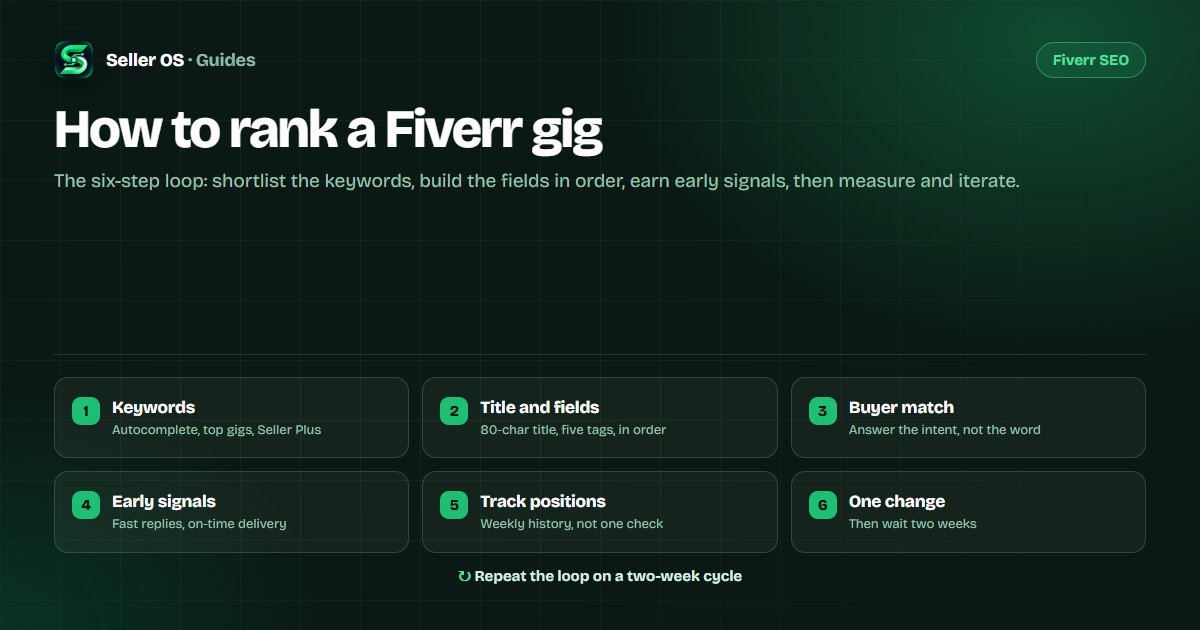
Most gigs do not fail because Fiverr changed the algorithm. They fail because the title targets a phrase buyers never type, the thumbnail loses the click, or the gig never collects enough orders for Fiverr to trust it. Six steps fix those problems in order, and each one ends with something you can measure.
Free plan available. Local-first data. Human review on every change.
What Fiverr actually ranks on
You will never see Fiverr's formula. What you can see is a funnel, and every stage of it leaks for a different reason. Impressions tell you whether the gig is matched to a search. Clicks tell you whether the title and thumbnail earn attention. Conversion tells you whether the offer and the price make sense. Delivery, response time, and buyer satisfaction tell Fiverr whether to keep showing you.
That order matters, because fixing the wrong stage wastes a month. A gig with zero impressions does not need a better description. A gig with plenty of clicks and no orders does not need new keywords. The six steps below work the funnel top to bottom.
Step 1 — Find the keywords buyers actually type
Start where buyers already are. Type the first words of your service into Fiverr search and write down every autocomplete suggestion; that list is built from real queries, not guesses. Then open the top three gigs for your main term and read their titles and tags — the words established sellers use are the words that convert in that category. If you have Seller Plus, its keyword views add another source when they are available.
Now narrow. Pick one primary keyword for the gig and three to five secondary terms. "Logo design" is a category; "minimalist logo design for tech startups" is a position. The narrower phrase usually has less competition and a buyer who knows what they want. Keep the shortlist somewhere you can revisit, because step five is measuring position for exactly these terms.
Step 2 — Build the gig fields in the right order
Fiverr's limits are concrete: an 80-character title (the "I will" prefix counts as six), five search tags of up to 20 characters, a 1,200-character description, and a 600-character profile bio. The free Fiverr character counter checks all of them while you type. The Fiverr gig SEO checklist works through the same fields one by one before you publish.
Write the title first, because it carries the primary keyword and the promise. Then pick the category and subcategory that match the search, add tags that complement the title instead of repeating it, and write the description around what the buyer receives and what you need from them. Packages, FAQ, requirements, and gallery come last.
A worked example. Primary keyword: "shopify product page redesign". Title: "I will redesign your Shopify product page to lift conversions." Tags: shopify redesign, product page, conversion design, ecommerce ux, shopify expert. Note that only one tag repeats the title's main phrase; the rest widen the net.
Step 3 — Match the buyer, not just the keyword
Two gigs can target the same phrase and get very different results, because one answers what the buyer means and the other only repeats what they typed. Read the top three gigs again and write down the promise each one makes: speed, deliverables, revisions, niche expertise. Your title should front-load the keyword and the outcome; your description should be specific about scope, turnaround, and what you need from the buyer before you start.
Keyword stuffing is the classic mistake here. Repeating the same phrase in the title, all five tags, and every paragraph does not improve ranking and makes the gig harder to read. Spend that space proving you understand the job.
Step 4 — Win the signals that follow the first orders
A new or edited gig has no performance history, so Fiverr has nothing to rank it on yet. The signals you control from day one: reply to buyer messages quickly, deliver before the deadline, keep revisions inside what the package promises, and resolve problems in conversation before they become cancellations. Those same signals feed your Success Score, which affects visibility across every gig you run.
Practically, this is a habits problem, not an SEO problem. Answer inquiries while they are warm, keep a short list of follow-ups so nothing sits unanswered, and watch deadlines a day early instead of an hour late. Seller OS drafts replies and follow-ups for your review and runs a deadline guard that warns you while Chrome is open.
Step 5 — Track position like a trend, not a screenshot
Fiverr search results vary by time, account, and location, so one check proves nothing. What matters is movement over weeks: is the gig appearing higher for the terms you chose, and are competitors moving around it? Check the same shortlist on a schedule, write the positions down, and compare against last month — not against a memory of last week. A Fiverr rank tracker is that habit minus the spreadsheet.
Seller OS stores per-keyword position history locally, and a Pro monitor can run the checks while Chrome is open so the record builds itself. Treat the numbers as directional evidence. They are strong enough to tell you whether a change helped; they are not a promise about what any individual buyer sees.
Step 6 — Audit, change one thing, wait two weeks
When a term stalls, find the leaking stage before you rewrite anything. Impressions without clicks points at the title and thumbnail. Clicks without orders points at the description, packages, or pricing. Orders that never turn into reviews points at delivery and communication. The Gig Performance Optimizer reviews a live gig against its own numbers, proposes changes for the stage that is losing buyers, and keeps a history of what you applied.
Then change one variable, note the date, and leave everything else alone for two weeks. If the trend improved, keep it. If not, revert and test the next hypothesis. Five changes at once teach you nothing, and daily edits reset the experiment before it produces evidence.
What does not work
- Buying favorites, clicks, or backlinks. It breaks marketplace expectations, wastes money, and risks the account.
- Publishing near-duplicate gigs in bulk. Your data splits across them and the category starts to look spammy.
- Always-online or auto-refresh gimmicks. They do not create the signals Fiverr measures.
- Keyword stuffing. No proven ranking value, worse readability, weaker conversion.
- Editing every day. It resets the test before you learn anything.
Where Seller OS helps
Seller OS is a local-first Chrome extension that handles the repetitive parts of this loop: keyword suggestions and rank history, a one-shot Gig Builder, a Gig Performance Optimizer that audits against your own numbers, inbox and brief drafts you review before sending, and Pro monitors for ranks, deadlines, briefs, and follow-ups.
It does not guarantee rankings, it does not send or publish anything on its own, and it works whether or not you subscribe to Seller Plus. Start with the Fiverr SEO tool guide for the workflow, or the Fiverr seller tools guide for the category map.

Fiverr gig ranking questions
How long does it take to rank a Fiverr gig?
There is no fixed timeline. It depends on how competitive your keywords are, how well the gig matches buyer intent, and how the gig performs once it gets impressions. Some terms move in weeks; others take months. Track your positions over time instead of checking once.
Can I rank a Fiverr gig without Seller Plus?
Yes. Seller Plus adds keyword and analytics data when you have it, but you can research keywords from autocomplete, competitor gigs, and your own order history. Seller OS works without Seller Plus and uses the data available on the pages you visit.
Should I edit my gig every day to rank higher?
No. Constant edits make it impossible to know what worked, and Fiverr re-evaluates gigs when they change. Make one deliberate change, give it time to collect impressions, and compare before changing anything else.
Does keyword stuffing help a Fiverr gig rank?
No. Repeating the same keyword in the title, tags, and description reads badly to buyers and adds no proven ranking value. Use the keyword where it fits naturally, then describe the outcome the buyer gets.