 Seller OS
Fiverr search results: how gig visibility works
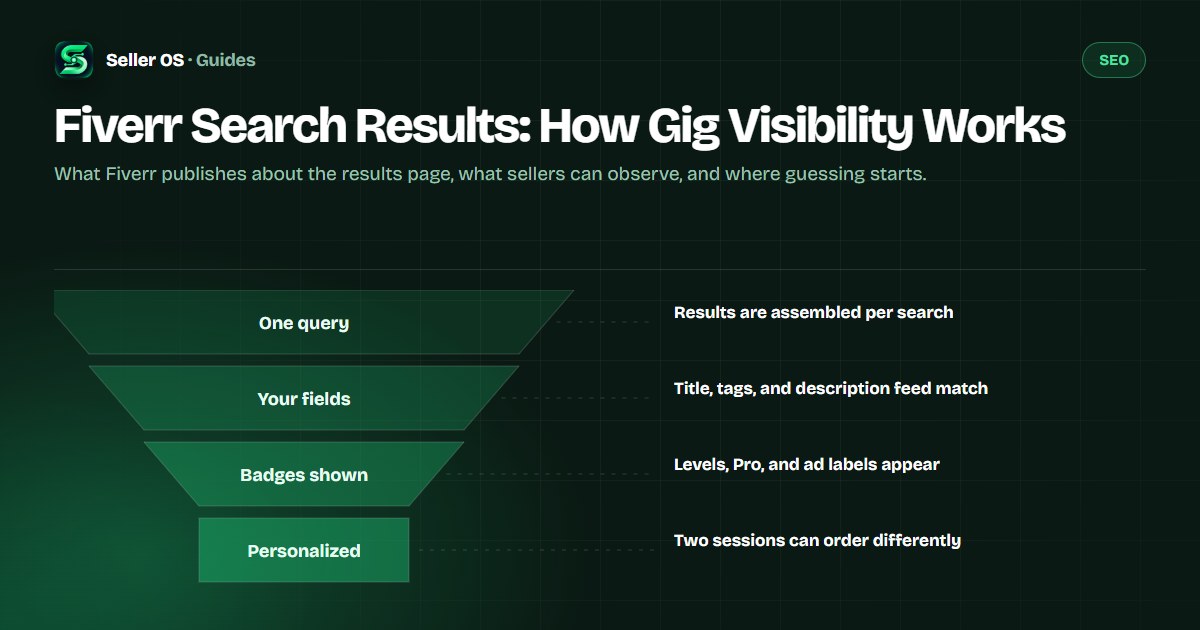
The Fiverr search results page is a ranked set of gig cards assembled for one buyer, one query, and one moment. Fiverr publishes the pieces it uses — the match between the query and your fields, quality and performance signals, badges, and paid placements — but not the formula or the weights. What you can work with is the part you control.
This guide covers how results are put together as far as Fiverr documents it and sellers can observe it: the surfaces your gig appears on, what a card shows before the click, how personalization and ads fit in, and how to sample your own visibility honestly.
Free plan available. Local-first data. Human review on every change.
Where your gig can appear to a buyer
Search is one surface, not the whole platform. Fiverr's definition of impressions names several at once: the homepage, category and subcategory pages, search results, and user profile pages. A gig that is quiet in search can still collect impressions from browsing surfaces, and the reverse is also true.
Practically, visibility has more than one entrance. Buyers who reach your category through navigation are a different audience from buyers who typed a query, and the same gig can convert very differently between the two.
Intent differs by surface too. Someone browsing a category is often earlier in the decision and comparing styles; someone typing a specific query has a job in mind and compares offers. The same placement can therefore be worth more or less depending on what the buyer typed, which is one reason raw impression counts need context before you react to them.
| Surface | How buyers arrive | What the gig shows |
|---|---|---|
| Homepage | Browsing and recommendations | Gig cards in thumbnail modules |
| Category pages | Navigating the category tree | Cards from that category |
| Search results | Typing a query | Ranked cards for that query |
| Profile pages | Viewing a seller | That seller's own gig cards |
What Fiverr publishes about ordering
Fiverr's search and recommendation article is explicit about a few things and silent about the rest. Pro status can influence search ranking. Fiverr's Choice is awarded to select services in recognition of outstanding quality and client satisfaction. Promoted listings show an ad badge in search results.
What is not published is the ordering formula: no weights, no thresholds, and no per-signal contributions. Treat any post that claims to know them as a guess. The honest model is simpler — a match between the query and the listing, plus signals about how buyers respond, filtered through the context of the person searching.
When sellers talk about performance signals, they usually mean observable behavior: whether buyers click, order, complete, and review. Fiverr's Success Score article describes quality areas such as client satisfaction and delivery time, but the search article does not publish how any of them weigh into ordering. Keep the two ideas separate.
- Pro status can influence search ranking, per Fiverr's search article
- Fiverr's Choice is awarded to select services for quality and client satisfaction
- Promoted listings carry an ad badge in results
What the gig card shows before a click
Before any click, the buyer sees a compact card: the first gallery image, the gig title, and the seller's level badge, which Fiverr states is visible on gig cards, gig pages, and profiles. Ads add their own label, and buyers can hide ads they find irrelevant without affecting organic rating.
That card is the whole surface for the first decision. If the image does not earn attention, the title and everything behind it never get read. This is why card-level visibility and page-level conversion are separate problems with separate fixes, and why improving one does nothing for the other.
The card is also smaller than sellers remember. It shows the image, the title, and the badge; it does not show your description, your process, or your revisions. Every one of those has to earn the click without being visible, which is why the title carries so much of the first decision.
Why two buyers see different results
Results are personalized to the session, location, and account doing the searching. Your own logged-in view is the most biased sample available to you, which is why manual checks work better in a private window from a consistent setup, at a consistent time.
Seasonality adds another layer. Demand for a phrase can rise and fall while your gig stays exactly the same, so the whole page can reshuffle around a listing that did nothing wrong. The way to tell the difference is to watch the neighboring gigs: if they moved with you, the page changed, not your gig.
Your logged-in session is the clearest example of the bias. It already knows what you browse, and it may surface your own gig or your usual competitors where a fresh visitor would see something else. That is not a bug to fix; it is a sampling bias to control for by checking the way a stranger would.
Ads, badges, and paid placements
Fiverr Ads places promoted gigs at the top of search results, on category pages, and in other placements across the platform. Those listings carry an ad badge, and sellers pay per click rather than per impression. Organic results continue below and alongside the ad area.
Badges work differently. Level badges come from the seller level system and appear on cards; Fiverr's Choice marks select services in recognition of quality and client satisfaction; ad badges mark paid placements. None of them substitutes for matching the query, but each one changes the context a buyer sees your card in.
Observe ads deliberately and without resentment. Ads answer a different question than organic results, and they change what sits above the fold. If you track organic visibility, note where the ad block ends and log positions relative to the same boundary each time, or your readings will jump for reasons that have nothing to do with your gig.
How to observe your own visibility
Pick three to five queries you sell against and sample them the same way each week: private window, one query at a time, note the page and the neighboring gigs, and log the date. Over several weeks the pattern tells you far more than any single check.
Keep the method boring on purpose. The moment you check at a different time of day, from a different network, or with a different account, the comparison changes underneath you. A boring routine is what turns scattered observations into a usable history.
Worked example, hypothetical. A seller samples one phrase for three weeks: not seen in the first three pages, then position 18 on page two, then 11 on page two. The gig is entering results while the category is busy. The useful move is to keep sampling honestly and check whether the neighboring gigs also changed before crediting the movement to an edit.
Choose your queries
three to five phrases you can realistically serve
Fix the method
same browser mode, same location setup, same day of the week
Log four facts
date, keyword, page and position, and one neighboring gig
Review monthly
compare direction across weeks, not single readings
The limits of what anyone can tell you
No one outside Fiverr can see the ordering model, and no tool can promise a position. What is knowable is your own sampled history, your funnel numbers, and the documented facts above. Everything else is inference, and inference should be labeled as such — including your own conclusions.
That is not a reason to stop watching. It is the reason to watch the same way every time and change one thing at a time, so the inference you draw has the best chance of being true.
Be careful with tools that promise certainty. A position checker can only report what a browser session sees, which is a sample. The value comes from repeating the sample consistently; the danger comes from treating one reading as the truth about your gig. Reading your own analytics is the other half of visibility, and the gig performance guide covers that side.
Where Seller OS helps
Seller OS keeps the observing side honest. The local Keyword Rank tracker samples the keywords you sell against on a schedule you set and keeps the history, including the competitor gigs around yours, so a position becomes a trend line instead of a memory. Keyword help suggests phrases when you are building the list.
The limit matches this article's point: it observes what a browser session can see and records it locally. It does not know Fiverr's ordering formula either, and nothing about your results is uploaded or published.

Fiverr Search Results questions
How does the Fiverr search algorithm decide what to show?
Fiverr publishes the ingredients, not the recipe. The match between the query and the listing, quality and performance signals, badges, and paid placements all play roles that sellers can observe. The ordering formula, its weights, and its thresholds are not published, so any claim to know them exactly is speculation.
Why do I see different gigs when I search the same thing?
Results are personalized to the session, location, and account, so two searches of the same phrase can legitimately order gigs differently. Your logged-in view is the most biased sample of all. Check from a private window at a consistent time before comparing readings.
Do ads push organic gigs down in Fiverr search?
Ads occupy promoted slots at the top of search results and other surfaces, and they carry an ad badge. Fiverr does not publish how ad slots interact with organic ordering. Observing where organic cards sit below the ad area is still useful week to week.
How many results pages should I check?
Track the depth that matters to buyers. Most clicks go to the first pages, so three pages is a practical scan and five is thorough. Record either the page and position or a simple not-seen note. Comparing the same depth each time matters more than going deeper.
Watch visibility the same way every week
Track your queries locally, keep the history, and let the trend speak before you edit anything.