 Seller OS
Fiverr Seller Plus alternative
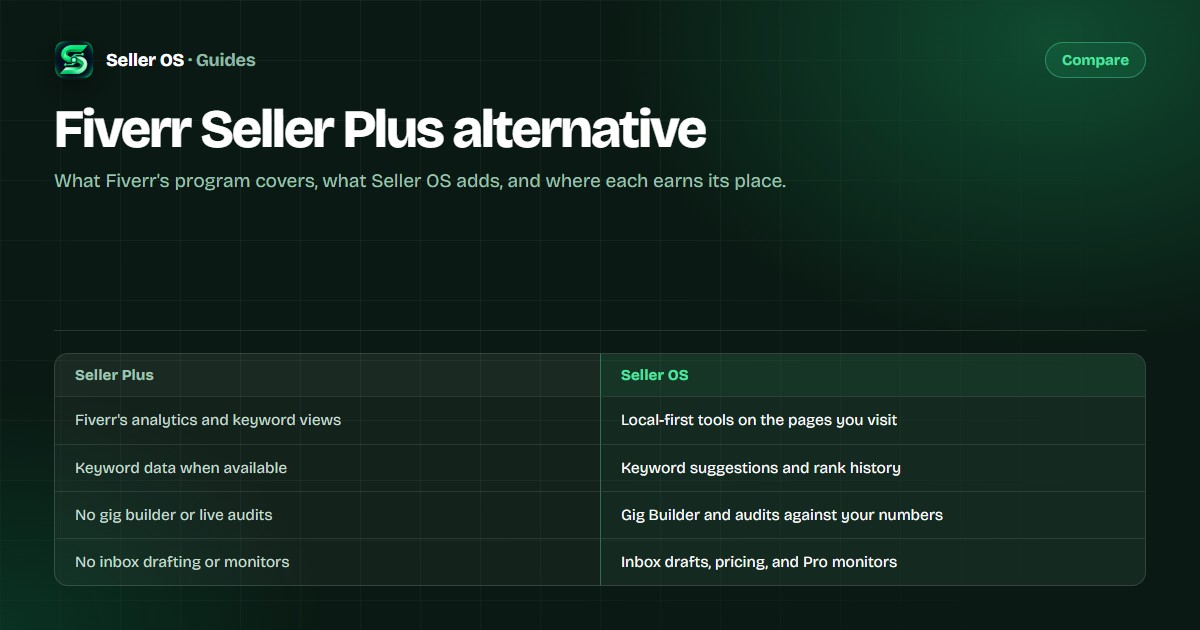
Seller Plus is Fiverr's own paid program: advanced analytics and keyword research when those views are available to you, gated by invitation or seller level. It will not build your gigs, draft your inbox, or watch ranks while you work. Seller OS is independent software that fills that layer and works without it.
Free plan available. Local-first data. Human review on every change.
What Seller Plus is
Seller Plus is Fiverr's own paid program for sellers. As Fiverr documents it, it adds advanced analytics and keyword research when those views are available to you, and it is gated by invitation or seller level. Read Fiverr's own description of Advanced Analytics for Seller Plus for the current terms, because Fiverr controls the program and can change it.
If you already have Seller Plus, keep it. Nothing in Seller OS depends on removing it, and Fiverr's own analytics remain the primary source for your account data. The two sit side by side: Fiverr supplies the platform numbers, and Seller OS supplies a workflow around the pages you already use.
What Seller OS adds
Seller OS runs as a Chrome extension and reads the Fiverr pages you visit. On top of that it adds keyword suggestions with per-keyword rank history, a one-shot Gig Builder that turns an idea or competitor URL into a full gig draft, and a Gig Performance Optimizer that audits a live gig against its own impressions, clicks, and conversions. Say you sell logo animation: the builder drafts the title, tags, and packages, and the optimizer checks how the live version performs before you rewrite anything. Inbox, brief, and order replies arrive as drafts you review; client records keep notes, tags, and repeat history; pricing review shows profit guardrails and a recent-price write guard.
Pro monitors watch briefs, deadlines, follow-ups, rank movement, competitor moves, and Success Score drops while Chrome is open. Reports, a daily action queue, and CSV exports of rank history and gig catalogs round it out. Data is stored locally in Chrome storage, human review applies to every action, and nothing sends or publishes automatically.
Seller Plus and Seller OS side by side
The table below lines up what each option provides. Seller OS details are exact, and Seller Plus is described only as Fiverr publishes it.
| Area | Fiverr Seller Plus | Seller OS |
|---|---|---|
| Fiverr data and analytics | Fiverr's own advanced analytics and keyword views when available | Reads the Fiverr pages you visit; does not replace Fiverr analytics |
| Keyword research | Fiverr's keyword research views when available | Suggests keywords from your gig and search context; you choose what to track |
| Gig building | Not part of the Seller Plus analytics and keyword features | One-shot Gig Builder from an idea or competitor URL; you approve the draft |
| Live gig audits | Not part of the Seller Plus analytics and keyword features | Audits a live gig against its own impressions, clicks, and conversions |
| Inbox and brief drafts | Not part of the Seller Plus analytics and keyword features | Drafts inbox, brief, and order replies for your review |
| Pricing review | Not part of the Seller Plus analytics and keyword features | Pricing review with profit guardrails and a recent-price write guard |
| Background monitors | Not part of the Seller Plus analytics and keyword features | Pro monitors run while Chrome is open: briefs, deadlines, follow-ups, ranks, Success Score |
| Rank history over time | Shows analytics views in your Fiverr account when available | Keeps per-keyword history locally so you can compare over time; CSV export |
| Data location | Inside your Fiverr account | Local Chrome storage on your machine |
| Who it is for | Eligible sellers who want Fiverr's own analytics data | Desktop Chrome sellers who want a gig, inbox, pricing, and tracking workflow |
Seller Plus vs Seller OS: the short answer
They are built for different jobs. Seller Plus is Fiverr's own paid program, documented by Fiverr's Help Center (checked September 2026) as Standard at $25/month and Premium at $49/month, with eligibility starting at Level 1 and Level 2 respectively; what it sells is access to Fiverr's own data — advanced analytics and keyword research when those views are available to you — plus program tools like coupons, promotions, and an ads credit. Seller OS is independent software for the work around that data: a Chrome extension that drafts gigs and inbox replies, audits live gigs against their own numbers, reviews pricing, and runs local monitors, with human review on every action.
They overlap in one place: keywords and rank. Seller Plus shows Fiverr's keyword views if you qualify for them, and Seller OS suggests keywords and keeps its own position history for the terms you choose to track, locally. That overlap is not a conflict — it is a reminder that neither tool controls ranking. Seller Plus earns its place when you are eligible and want the platform's own analytics plus the program benefits; Seller OS earns its place when you want the daily workflow around the pages you already use, without Seller Plus eligibility requirements. If the keyword side is the part you are weighing, the rank tracker vs Fiverr analytics guide walks through the difference, and Fiverr SEO tools vs doing it manually covers what the workflow saves.
Two honest notes. Seller Plus is not a gig-building, inbox-drafting, or chosen-keyword rank-history service — its published feature set is Fiverr's own analytics views, growth tools, payments, follow-ups, and support. And Seller OS does not promise rankings, impressions, or sales: Fiverr controls its search systems, and the extension only observes, drafts, and tracks what is visible on the pages you open.
Where Seller OS helps
Seller OS covers the workflow around the data rather than the data itself. A typical day: check the daily action queue, review a monitor alert about a deadline or a slipping keyword, approve a drafted reply, audit a gig that lost clicks, and revisit a package price with the guardrails in view. Every step ends with you, and every record stays on your machine.
See the Fiverr seller tools guide for the complete workflow, or the Fiverr SEO tool for keyword suggestions, rank history, and live gig audits.
Honest limits
- Seller OS does not replace Fiverr analytics; Fiverr remains the source for your account data.
- It does not guarantee rankings, impressions, clicks, or sales. Fiverr controls its search systems.
- Monitors run only while Chrome is open, and nothing auto-sends or auto-publishes.
- Seller Plus availability, features, and terms are controlled by Fiverr and can change.
- Seller OS is independent software for Fiverr sellers, not affiliated with or endorsed by Fiverr.
Seller Plus alternative questions
Is Seller OS a replacement for Seller Plus?
No. Seller Plus is Fiverr's own paid program for advanced analytics and keyword research when those views are available. Seller OS is independent software that adds a gig, inbox, pricing, and tracking workflow. Many sellers can use both.
Can I use Seller OS without Seller Plus?
Yes. Seller OS works without Seller Plus. It uses the Fiverr pages you visit and the data you enter, keeps records locally, and never requires an advanced analytics subscription.
Does Seller OS show Fiverr's analytics?
It does not replace them. Seller OS reads what is visible on the pages you use and keeps your own history, reports, and exports locally. Fiverr remains the source for account analytics.
Who is Seller OS for?
Fiverr sellers on desktop Chrome who want gig building, audits, inbox drafts, pricing review, client records, and optional monitors, with local data and human review at every step.
Add the workflow Seller Plus does not cover.
Gig building, audits, drafts, pricing, and local rank history, with human review on every change.