 Seller OS
Drive traffic to a new Fiverr gig with zero orders
A new gig with zero orders is not one problem; it is three. Impressions, clicks, and orders fail for different reasons, and fixing the wrong stage wastes the weeks when a gig has the most room to grow.
This is a cold-start playbook for the first 60 to 90 days. It shows how to work out which stage is breaking, what to change at each one, how to seed a little outside traffic, and how to hold a realistic timeline instead of refreshing the analytics page.
Free plan available. Local-first data. Human review on every change.
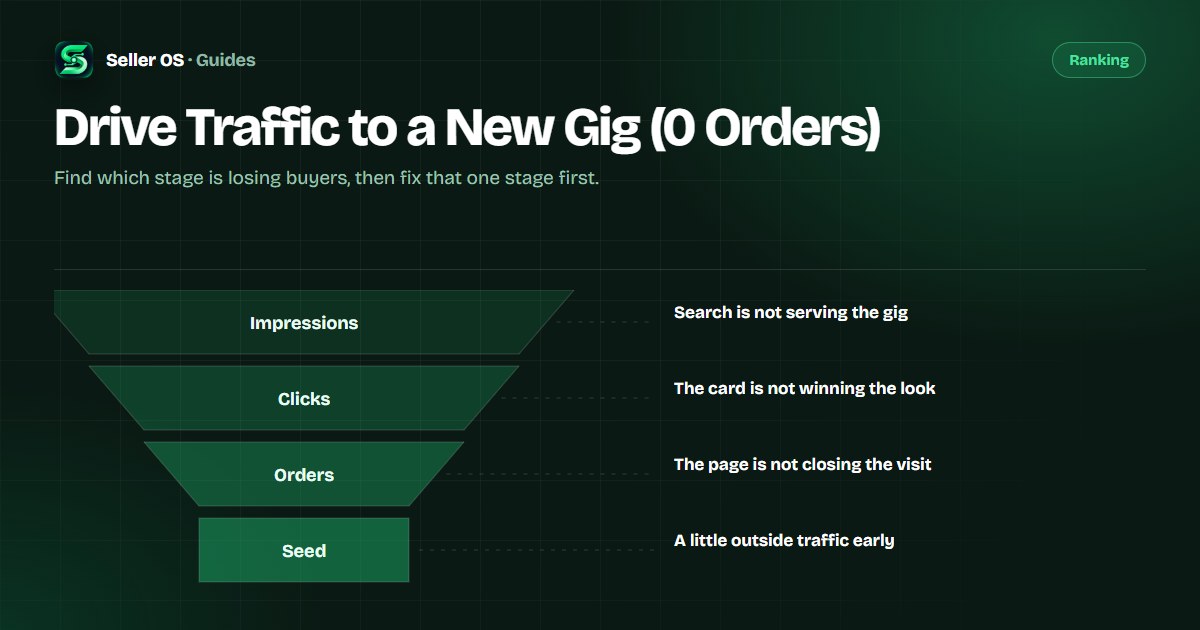
Diagnose the funnel in three stages
Open your analytics and read the three numbers in order. If impressions are near zero, nothing downstream matters yet. If impressions are arriving but clicks are flat, the card is the problem. If clicks arrive but orders do not, the gig page is the problem.
Work one stage at a time. Changing the description when the gig gets no impressions, or changing the title when clicks already come, is the most common way new sellers spend a month on the wrong fix.
| Symptom | Stage | Look at |
|---|---|---|
| Almost no impressions | Visibility | Title, tags, category, gig status |
| Impressions, no clicks | Click | Main image, price shown, first line |
| Clicks, no orders | Conversion | Packages, gallery, FAQ, reviews |
| Steady clicks, few orders | Offer fit | Scope, price point, buyer type |
Stage one: no impressions
No impressions usually means search is not matching the gig to a query, not that the market is empty. Check that the gig is active, that the category is the right one, and that the title and tags carry the phrase a buyer would actually type.
Fiverr's search and recommendation system decides what to show, and a brand-new gig has little history to work with. The ranking guide and the zero-impressions triage cover this stage in full.
Stage two: impressions but no clicks
Impressions with no clicks is a card problem. The thumbnail is read before any text, so it has to be legible at thumbnail size and show the deliverable rather than a logo. The first visible line of the title and the price band do the rest.
Test one change at a time. A new main image is easy to compare against the old one because the impressions stay constant while the click number moves.
- Legible thumbnail that shows the actual deliverable.
- Title front-loads the service a buyer searches for.
- Price band is competitive for the category.
- Optional video pinned in the gallery.
Stage three: clicks but no orders
Clicks that do not convert mean the page failed the buyer's check. They arrived curious and left unsure, usually because the packages, the gallery, or the FAQ did not answer the question they came with.
Read your own gig as a stranger would. The package names should make the difference obvious, the gallery should show proof, and the FAQ should remove the last objections. The conversion checks break this down further.
Seed a little external traffic
A little outside traffic can give a new gig its first visits while search is still deciding. Keep it small and honest: a relevant community answer, a personal network note, or a professional post that leads with something useful. The Reddit and LinkedIn guide covers the channel rules.
Do not buy traffic or use bots. It does not convert, and it can put the account at risk. The point of seeding is a few real humans, not a number.
The patience math for a new gig
A new gig needs orders and reviews before search can rank it with confidence, and those take weeks to accumulate. Treat the first 60 to 90 days as a period of small, deliberate changes rather than a countdown to a launch spike.
Pick one metric per week, change one thing, and record the result. That habit produces a gig that fits its market by the end of the quarter, and it avoids the trap of rewriting everything at once and learning nothing.
Where Seller OS helps
Seller OS is built to make those small weekly changes observable. The gig optimizer reviews a live gig's copy, gallery, and conversion signals against the gig's own performance data, and monitors track the numbers over time so a change can be compared with what happened before it.
It runs locally, drafts and tracks rather than publishing, and leaves every Save, Continue, or Publish click to you. Analytics history and client notes stay in Chrome local storage.

Drive Traffic to a New Gig questions
Why is my new Fiverr gig getting no orders?
A brand-new gig usually fails at one of three stages: no impressions, impressions but no clicks, or clicks but no orders. Each has a different fix. Check your analytics in that order and change only the stage that is actually breaking, one adjustment at a time.
How long does a new Fiverr gig take to get orders?
There is no fixed number, and no one can promise one. A new gig needs impressions, clicks, and some order history before it can rank with confidence, and that normally builds over weeks rather than days. Use the first 60 to 90 days for steady, measured changes.
Should I promote a gig that has no orders yet?
A small amount of honest external attention can help, as long as it comes from real people and respects community rules. Keep it light. Paid traffic and bots do not convert and can put the account at risk, so they are not a shortcut worth taking.
How many impressions should a new gig get?
There is no published target, and it varies by category and competition. What matters is the trend, not a single number. If impressions are near zero, fix visibility first. If they are arriving, shift attention to clicks and then to conversion instead.
Fix the stage that is actually broken.
Read impressions, clicks, and orders separately, change one thing a week, and give the gig a quarter before you judge it.