 Seller OS
New Fiverr gig not ranking: a 14-day triage plan
A brand-new gig that is not ranking is usually not broken. It is either still in review, too new for the 30-day analytics view to say much, or mismatched with what buyers type. The first 14 days are for triage: check the four things that block visibility, then make one deliberate change if they all pass.
This plan is specific to a new gig's first two weeks. If your gig is older and suddenly quiet, the diagnosis is different and the guide below covers it. Here you get the eligibility checks, the signal checks, and the decision point at day 14.
Free plan available. Local-first data. Human review on every change.
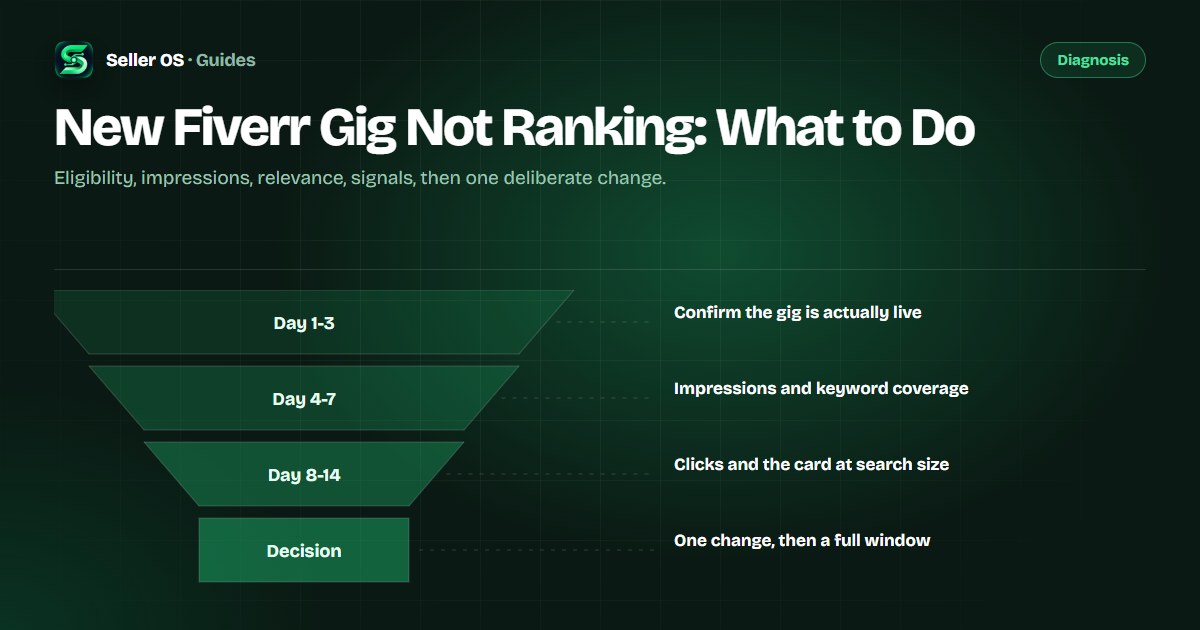
Days 1-3: confirm the gig is eligible
Before diagnosing relevance, confirm the gig can appear at all. Fiverr's gig management page can show Draft, Pending Approval, Requires Modification, Denied, or Paused, and a gig that is not Active will not surface no matter how good its fields are.
Pending Approval means the gig is under review, and Fiverr does not publish a review turnaround time, so the only action is to wait and watch the page. If the gig shows Denied, Fiverr says you can view the reason on the gig management page; Fiverr does not publish a dedicated denied-gig process, and fixing and resubmitting the listing is the practical path when the reason describes an edit. Also confirm you are within your active gig limit, which is 4 for a new freelancer.
- Status is Active, not Draft, Pending Approval, Requires Modification, or Paused.
- The category matches the service you actually deliver.
- A gallery image is present, since one image is the minimum to publish.
- You are inside your gig limit for your level.
Days 4-7: read the impression column
Impressions are the number of times your gig appeared in Fiverr thumbnails, including the homepage, category pages, search results, and profile pages, per Fiverr's definition. In a gig's first week the 30-day statistics view has little to show, and Fiverr does not publish how often the numbers refresh, so read direction rather than precision.
Zero impressions in week one has two ordinary explanations: the gig is new enough that it has not been shown much yet, and the phrases you are watching may be more competitive than the gig's current relevance can support. Check that your title and tags cover the exact phrases buyers type before assuming something is wrong.
Watch the column across consecutive days rather than refreshing it hourly. Fiverr does not publish a refresh schedule for standard gig statistics, so a single reading is a snapshot, and the direction across several days is the part worth acting on.
Days 4-7: test relevance directly
Run a private-window search for your primary phrase and read the results like a buyer. Two findings matter: whether your gig appears at all in the first pages, and what the top results have in common. If every top gig's title contains a qualifier yours lacks, a platform, an industry, or a format, that is a relevance clue.
Also check field consistency. The phrase in your title should be supported by the positive keywords field and tags, not contradicted by them. Fiverr's documentation states the matching priority as title first, then positive keywords, then description, so a phrase missing from the first two layers starts at a disadvantage.
Search privately
use a private window and your exact primary phrase.
Log the result
whether your gig appears, and where.
Read the top three
note the qualifier they share.
Compare the fields
title, tags, and positive keywords against that qualifier.
Days 8-14: early signals and the card
By the second week, the question shifts from whether the gig is visible to whether it is clicked. If impressions appear but clicks do not, look at what buyers see first: the first gallery image and the title at search-result size. Fiverr's image guidance keeps text to ten words or fewer, and a thumbnail that needs full size to make sense fails at card size.
If clicks appear but orders do not, the gap is in the offer: the description's opening promise, the package structure, or the price relative to the neighbors. That is a conversion problem, and changing keywords will not fix it. The description checker runs that audit field by field.
Day 14: make one deliberate change
If the gig is Active, impressions exist, and the fields match what buyers type, the gig is not stuck, it is early. Make no changes and let the window run. If one check failed, fix exactly that: an unclicked gig gets a clearer first image or title, and an unseen gig gets a relevance fix to the title or tags.
One change, then a full measurement window. Fiverr's keyword guidance is to allow at least 30 days before reviewing impact, and a new gig with no history needs that patience even more. Reverting at the first quiet week is how sellers end up with a gig that has been edited five times and diagnosed zero times.
Write the change and the date in the same place as your triage notes. When the window closes, the note tells you what you changed and why, which is the difference between an experiment and a blur of edits.
Triage mistakes that waste two weeks
The first mistake is editing during the review state, because the gig is not visible yet and field changes cannot fix what is not broken. The second is judging a new gig against an established gig's analytics, since the comparison hides the fact that one has history and the other does not.
The third is making three changes at once, which turns day 14 into a guess. The fourth is assuming a quiet start means a dead gig: with no published timeline and a 30-day analytics window, two weeks is early, and the triage exists to catch real blockers, not to declare failure.
And one about expectations: day 14 is a checkpoint for decisions, not a deadline for results. The plan separates blockers from normal slowness, and it does not force a change that the evidence does not support.
Where Seller OS helps
Seller OS supports the triage with evidence. The rank tracker records where a new gig appears for your phrases and whether competitors sit above it, while the gig audit checks the live fields for the relevance and attention issues this plan looks for. Both read what is already visible on Fiverr and keep the history locally.
The limits matter here: it cannot see whether Fiverr will rank the gig, cannot speed up a review, and does not publish anything. It gives you a record, so day 14 is a decision made on evidence rather than mood.
New Fiverr Gig Not Ranking questions
Why is my new Fiverr gig not showing in search?
Check the gig's status first. Fiverr's gig management page can show Draft, Pending Approval, Requires Modification, Denied, or Paused, and only an Active gig appears in search. If the gig is Active, run a private-window search for your exact phrase, because a live gig can still rank beyond the pages you scanned.
How long should I wait before changing a new gig?
Give it a full measurement window, since Fiverr's guidance for keyword changes is at least 30 days, unless a triage check finds a concrete blocker like a wrong category or a missing gallery image. Editing weekly resets your window and can trigger reviews on significant changes.
My new gig has impressions but no clicks. What is wrong?
That points at the attention layer: buyers see the card but do not open it. Look at the first gallery image and the title at search-result size, where the text limit Fiverr recommends is ten words or fewer. If the image needs full size to make sense, it is not doing its job in search.
Can a new Fiverr gig rank in its first week?
Fiverr does not publish a ranking timeline, so no honest answer promises a week or a month. What you can check in week one is eligibility and coverage: is the gig Active, does the title contain the phrase buyers type, and do the tags support it. After that, signals need time.
Triage the blockers, then wait the window.
Run the four checks in order and make one change only when a check actually fails.