 Seller OS
Fiverr gig gets clicks but no orders
Clicks but no orders means the gig card is doing its job and something between the page and the checkout is not. Fiverr counts a click when a buyer opens your gig from a thumbnail, and an order only after a separate chain of decisions. The drop-off lives in one of those layers, and it is usually findable.
This guide gives you five suspects ranked by how often they cause the gap, the evidence that confirms each, and the smallest fix for it. You will also get a worked example of reading the pattern without cutting your price first.
Free plan available. Local-first data. Human review on every change.
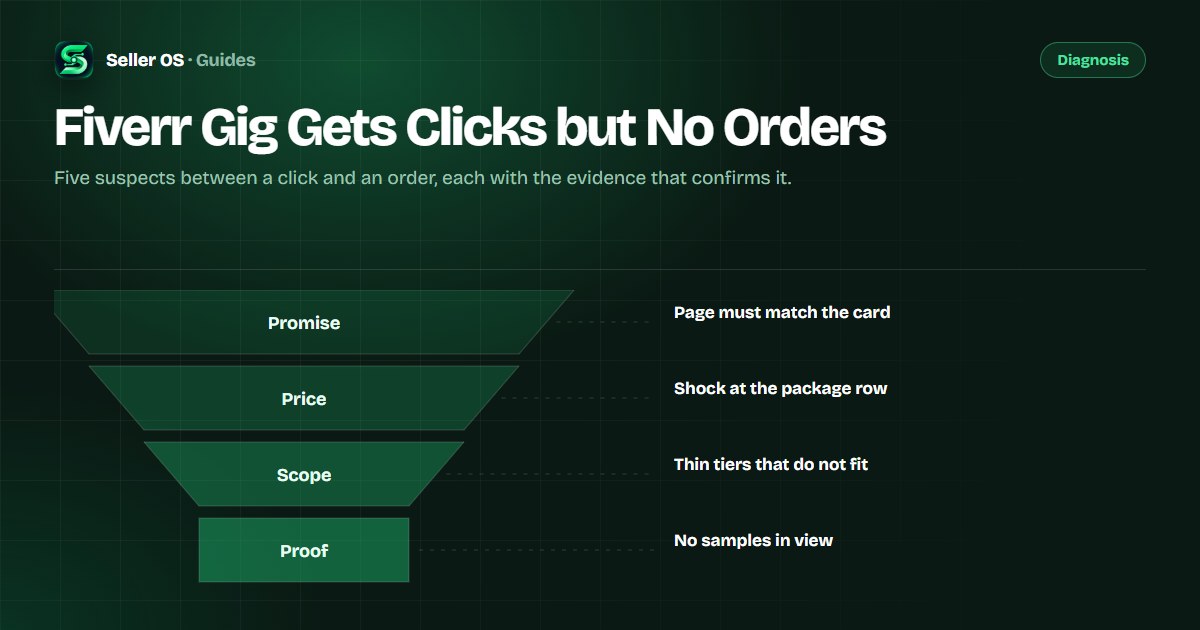
What clicks without orders tell you
Per Fiverr's definitions, a click counts when a buyer opens your gig after seeing it on the homepage, a category page, search results, or a profile. An order is the end of a separate chain that runs through your page, packages, proof, and messages. When clicks accumulate and orders do not, the problem sits downstream of the card.
That is useful news. Card problems are about visibility and the fixes are often a new audience; page problems are about the offer, and the fixes are mostly writing, structure, and response habits. The second kind is cheaper to test and faster to read.
There is another reason to look downstream first: clicks are the weaker signal. A gig can collect clicks from curiosity, from a broad placement, or from a buyer who never intended to order today. Orders are unambiguous, which is why the layers between them deserve the diagnosis.
It also helps to separate the two questions buyers answer in sequence: should I open this, and should I buy this. The first belongs to the card and the second to the page, and only the second describes the gap you are diagnosing.
One framing keeps the diagnosis tight: treat every click as a question the page must answer. What will I get, when will I get it, and why you. Orders happen when the page answers all three before doubt gets a turn. If the answers sound vague when you read them back, the description guide covers the rewrite.
Five suspects between click and order
Almost every click-to-order gap traces back to one of five things: an expectation mismatch, price shock, packages that do not fit a normal job, proof a buyer cannot see, or replies that arrive too slowly. Each one leaves different evidence, which is why guessing is avoidable.
Notice that four of the five suspects live on your page, and only one lives in the inbox. That distribution matters: most click-to-order gaps are fixed with clearer writing and structure, not with a new audience or a lower price. The packages guide covers rebalancing the three tiers when scope is the suspect.
Rank the suspects by evidence, not by emotion. The suspect with a visible trace in your inbox, your package rows, or your reply history is the one to test first, even if a different one feels more comfortable to fix.
| Suspect | Evidence to check | Smallest fix |
|---|---|---|
| Expectation mismatch | Page top does not repeat the card's promise | Rewrite the opening lines |
| Price shock | Buyers open packages and leave | Add a scope line, not a discount |
| Unclear packages | Middle tier cannot cover a normal job | Rebalance the three tiers |
| Invisible proof | No samples near the packages | Surface a real sample early |
| Slow replies | Questions sit unanswered for hours | Answer first messages faster |
Match each suspect to one evidence source
Work through the list with the evidence in front of you rather than from memory. One source per suspect keeps the diagnosis honest, and it usually takes less than an hour to gather all five.
Write the evidence down as you find it. A sentence like the package rows leave revisions ambiguous is actionable; a feeling that the gig seems fine is not. Notes also make the next window easier, because you can compare what you believed before the fix with what buyers did after it.
Expectation
read your page top and compare it with the promise on your card
Price
read the package rows as a buyer and ask what feels missing for the money
Scope
compare the middle tier with the job most buyers describe in your inbox
Proof
open your portfolio and check whether a buyer can see work like their job
Speed
check your response time and how long first questions wait
Scenario: fixing a price-shock page
Hypothetical example. A gig collects 12 to 15 clicks a week and no orders for three weeks. Inbox threads show two buyers asking whether revisions are included and one asking about file formats. The page opening is fine; the questions all begin at the package rows, where scope is described in vague terms.
Instead of cutting the price, the seller adds a scope line to each package, states the revision count inside the tier, and moves a sample image above the description fold. Orders appear over the following two weeks and the repetitive questions drop. The fix was clarity, not a discount.
The read took two weeks because the gig collected enough clicks to make the comparison fair. When a gig gets fewer clicks than that, extend the window instead of trimming your standards, and treat any early order as encouragement rather than proof.
When you do find the fix, keep the old version. Saved wording lets you revert if the change reads neutral or worse, and a fix that cannot be reversed is not a test; it is a commitment.
Response speed is part of conversion
Fiverr tracks response rate as the share of first replies sent within 24 hours over the last 90 days, visible to freelancers only. Response time — the average hours it takes you to answer a new message — is what clients can see, per the response time and rate article. A strong page paired with slow answers still loses buyers who are comparing three sellers in three tabs.
The practical rule: answer the question that blocks checkout first, even with a short holding reply. A quick honest answer keeps the thread alive while you check the details; silence sends the buyer to the next tab and often ends the comparison there.
Holding replies are fine when they are honest. A message saying you will confirm scope details shortly keeps the buyer informed and the thread open, and it costs a fraction of the time a full answer takes. What kills the order is the thread that sits still for a day.
Speed also compounds. Buyers who get fast answers come back and recommend; buyers who wait often do neither. Over months, response habits shape the review profile that makes your page credible in the first place.
What not to do when orders stall
Do not cut the price first. Price is the easiest suspect to blame and the most expensive to fix, because a lower price changes your margins and anchors every later conversation. Rule out promise, scope, proof, and speed before you touch it. When price really is the objection, the price conversation guide covers the answer without a discount.
Do not rewrite everything at once either. A full rewrite of page, packages, and images gives you no way to know which change worked, and it discards the familiarity buyers already have with the listing. One suspect, one fix, one window.
Sequence the fixes. If two suspects look equally likely, test the one whose fix is cheapest and most reversible first, usually copy or scope before price or structure. You can always carry the second change into the next window with better evidence behind it.
- Discounting before you have diagnosed anything
- Rewriting the page and packages in the same window
- Judging a fix on a single week of clicks
- Ignoring the questions buyers actually asked
Where Seller OS helps
Seller OS helps you read the page-side evidence. The Gig Performance Optimizer reviews the live gig's copy, gallery, and conversion signals against the gig's own performance data and proposes specific changes, so the suspect you test is the one your data supports. Package pricing review adds margin context before any price move.
On the inbox side, reply drafts answer first questions in your voice, and you edit before sending. Local client records hold notes and history for buyers you have already served. The tool stops at drafts and suggestions: every Send, Save, and Publish remains a human action.

Fiverr Gig Gets Clicks but No Orders questions
Why does my Fiverr gig get clicks but no orders?
The click proves the card worked; the order depends on the page, packages, proof, and conversation. Common causes are an opening that does not match the card's promise, package rows that feel thin for the money, no visible sample work, and questions left unanswered. Diagnose one suspect at a time.
Should I lower my price if nobody orders?
Not first. Rule out promise, scope, proof, and reply speed before changing price, because a discount changes your margins and anchors future negotiations. If price is genuinely the blocker, widen the scope or restate the value before cutting, then test in its own window.
Do unanswered messages hurt my gig?
Fiverr tracks response rate as the share of first replies sent within 24 hours over the last 90 days, and clients can see your average response time. Slow replies do not just lose the thread in front of you; they close the gap for a comparison shopper working through several tabs.
How long should I give a page change before judging?
Two to four weeks is a reasonable minimum for a small gig, and longer if clicks are thin, because a handful of sessions proves nothing. Change one thing per window and compare the same metric over equal lengths. If the result cannot be read in a month, the sample is too small.
Diagnose before you discount
Check promise, scope, proof, and reply speed first, then change one thing and watch the same metric.