 Seller OS
Fiverr early payout missing: why and when
The Early Payout button appears in the Earnings Activity table next to eligible clearing orders — when it is there. When it vanishes, sellers often assume a bug. In reality, Fiverr publishes specific eligibility rules, order-type exclusions, and account-standing gates that hide the option.
This guide walks the checks in order: seller level and membership, order age and type, verification status, and open disputes. It explains the 1% fee structure and the three timing tiers Fiverr publishes, and it tells you when a support ticket is actually warranted.
Free plan available. Local-first data. Human review on every change.
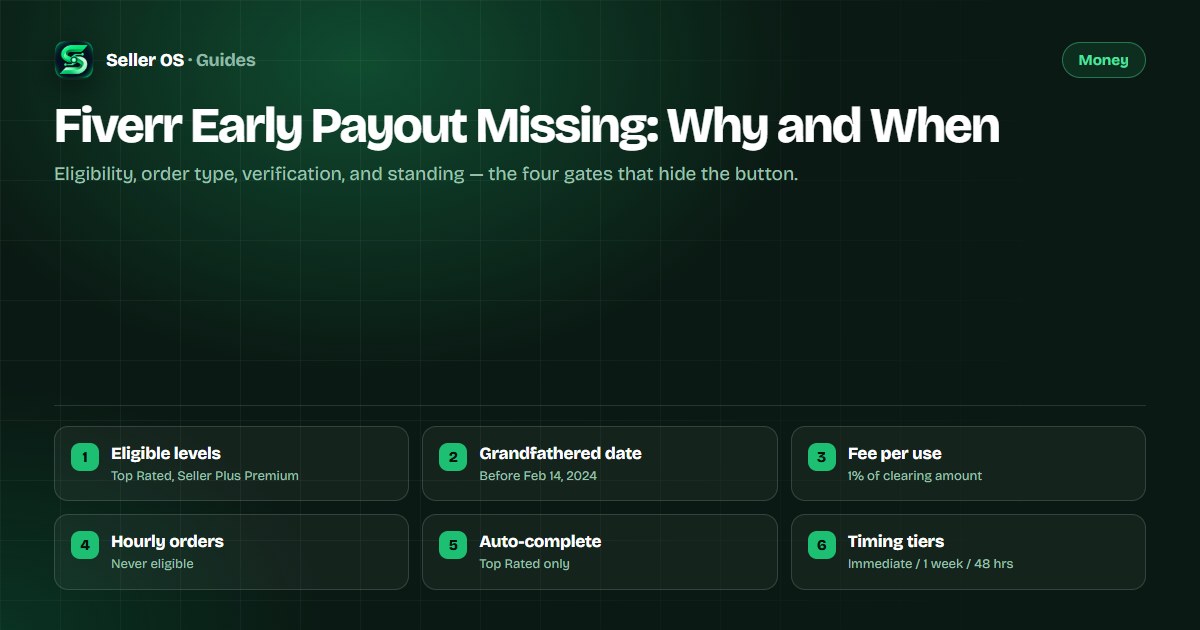
The four eligibility gates Fiverr publishes
Fiverr's Early Payout help article states eligibility is limited to Top Rated freelancers and Seller Plus Premium members. A grandfathered group — freelancers who had access before February 14, 2024 — retains eligibility as long as they keep meeting the unpublished criteria. Fiverr does not publish a country list for Early Payout.
Beyond level and membership, the button respects three additional gates: the order must be a type that qualifies, the account must be in good standing with verification complete, and no open dispute or refund request can be attached to the order. If any gate fails, the button does not appear.
- Gate 1: Seller level — Top Rated, or Seller Plus Premium (Level 1 or Level 2).
- Gate 2: Order type — standard and milestone orders qualify; Hourly orders never do.
- Gate 3: Account standing — verification complete, no active restriction or suspension.
- Gate 4: Order state — clearing, no open dispute, no buyer refund request, not auto-completed (unless Top Rated).
Three timing tiers for when the button appears
Even when all gates pass, the button does not always appear the moment an order completes. Fiverr publishes three timing tiers based on the combination of level and membership:
Top Rated or Level 2 with Seller Plus Premium and meeting criteria — Early Payout is available immediately after the order is completed. Level 1 with Seller Plus Premium and meeting criteria — the button appears one week after completion. Top Rated or Seller Plus Premium but not meeting the unpublished criteria — the button appears 48 hours after completion. These are the only timelines Fiverr publishes.
| Seller status | Meets criteria | Button appears |
|---|---|---|
| Top Rated or Level 2 + Seller Plus Premium | Yes | Immediately after completion |
| Level 1 + Seller Plus Premium | Yes | One week after completion |
| Top Rated or Seller Plus Premium | No | 48 hours after completion |
Order types that never show the button
Hourly orders are explicitly excluded from Early Payout — Fiverr's help article states they are not eligible, period. Auto-completed orders (orders the system completes after the client takes no action for three days, or eight days for milestones) are only available for Early Payout if the seller is Top Rated. For Level 1 or Level 2 with Seller Plus Premium, an auto-completed order will not show the button even if every other gate passes.
A common mistake sellers make is expecting Early Payout on an Hourly contract or an auto-completed order when they are not Top Rated. The exclusion is by design, not a bug.
Confirm the order is not Hourly
Hourly orders never qualify.
Check whether the order auto-completed
only Top Rated sellers get Early Payout on auto-completed orders.
Verify the order is in Clearing status, not Pending or Available.
Ensure no dispute or refund request is open on the order.
The 1% fee and how the payout works
When the button appears, clicking it shows the fee for review before confirming. Fiverr states the fee is 1% of the total clearing amount, calculated on your earned revenue only (80% of the order value), not the full order amount. The fee is deducted from the payout; you receive the clearing amount minus 1%.
Each use is a separate transaction with its own fee. The early payout does not change the order's completion date, the review window, or the buyer's ability to leave a review. It only moves the funds from Clearing to Available ahead of the standard schedule.
Verification and account standing — silent blockers
Fiverr routinely requires ID verification. The verification help article states you have 14 days to complete the process after notification; failing to do so removes your ability to sell. An unverified account or one with a pending verification will not show Early Payout, even for Top Rated sellers.
Account restrictions (the 60-day intermediate step before permanent suspension) allow withdrawal of available and pending clearance funds but do not explicitly confirm Early Payout access. A suspended account cannot log in at all. If your account shows any restriction banner, treat Early Payout as unavailable until the restriction lifts.
- ID verification incomplete or pending — Early Payout hidden.
- Account restricted (60-day window) — Early Payout likely hidden; standard withdrawals still work.
- Account suspended — no login, no Early Payout, 90-day wait for any withdrawal.
- Seller Plus Premium expired — reverts to level-based eligibility only.
Run these checks in order before assuming a bug
Start with the gates that are easiest to confirm and move to the ones that require a support lookup. Each check either explains the missing button or narrows the cause to something support can investigate.
If you reach the end of the list and every gate passes — level, membership, order type, order age, verification, standing, no disputes — then a support ticket with the order number, a screenshot of the Activity row, and your seller level is the correct next step.
Confirm your current level and Seller Plus status on the dashboard.
Check the order type
standard or milestone only; Hourly and non-Top-Rated auto-completed are excluded.
Verify the order is in Clearing (not Pending, not Available) and note the completion date.
Apply the timing tier: immediate, one week, or 48 hours based on your level and membership.
Check for open disputes or buyer refund requests on that order.
Confirm ID verification shows as complete in Account Settings.
Confirm no account restriction or suspension banner is active.
If all pass and the button is still missing, file one ticket with the order number and screenshots.
When a support ticket is warranted
Fiverr's help article states support cannot review, modify, or make exceptions to your eligibility status. That means support will not grant Early Payout if you do not meet the published gates. They can, however, investigate a technical issue — for example, a clearing order that meets every published rule but shows no button due to a display error.
Do not open a ticket to ask why you are not eligible; the criteria are not disclosed. Open a ticket only when you have confirmed every published gate and the button is still absent. Include the order number, completion date, your seller level, Seller Plus status, and a screenshot of the Activity row.
Where Seller OS helps
Seller OS tracks your order timelines and seller level locally, so you can see at a glance whether an order has reached the completion date that should trigger Early Payout for your tier. The Pro monitors (Pro plan) include a Success Score guardian that alerts on level changes — if you drop from Top Rated, Early Payout eligibility changes immediately.
It does not unlock Early Payout, bypass eligibility gates, or calculate the 1% fee for you. It only surfaces the data you need to run the checklist without digging through multiple Fiverr pages.

Fiverr Early Payout Missing questions
Why is my Fiverr Early Payout button not showing?
The button hides when any eligibility gate fails: you are not Top Rated or Seller Plus Premium, the order is Hourly or auto-completed (non-Top-Rated), the order is not yet in Clearing, the timing tier has not elapsed, a dispute or refund is open, verification is incomplete, or the account is restricted. Check each in order.
What are the Early Payout eligibility requirements?
Fiverr publishes that Early Payout is for Top Rated freelancers and Seller Plus Premium members, plus a grandfathered group from before February 14, 2024. The specific criteria beyond level and membership are not disclosed, and support cannot review or make exceptions.
How long after order completion does Early Payout appear?
It depends on your status: Top Rated or Level 2 with Seller Plus Premium meeting criteria — immediately; Level 1 with Seller Plus Premium meeting criteria — one week; Top Rated or Seller Plus Premium not meeting criteria — 48 hours. Hourly orders never qualify; auto-completed orders only for Top Rated.
Is the Early Payout fee refundable if I do not use it?
The 1% fee applies only when you confirm the early payout. There is no fee for the button being available. If you do not click it, the funds clear on the standard schedule with no early-payout fee. The standard clearance has no fee.
Run the checklist, then decide
Confirm level, order type, timing tier, disputes, verification, standing. If all pass and button missing, file one precise ticket.