 Seller OS
Fiverr gig image size and requirements, explained
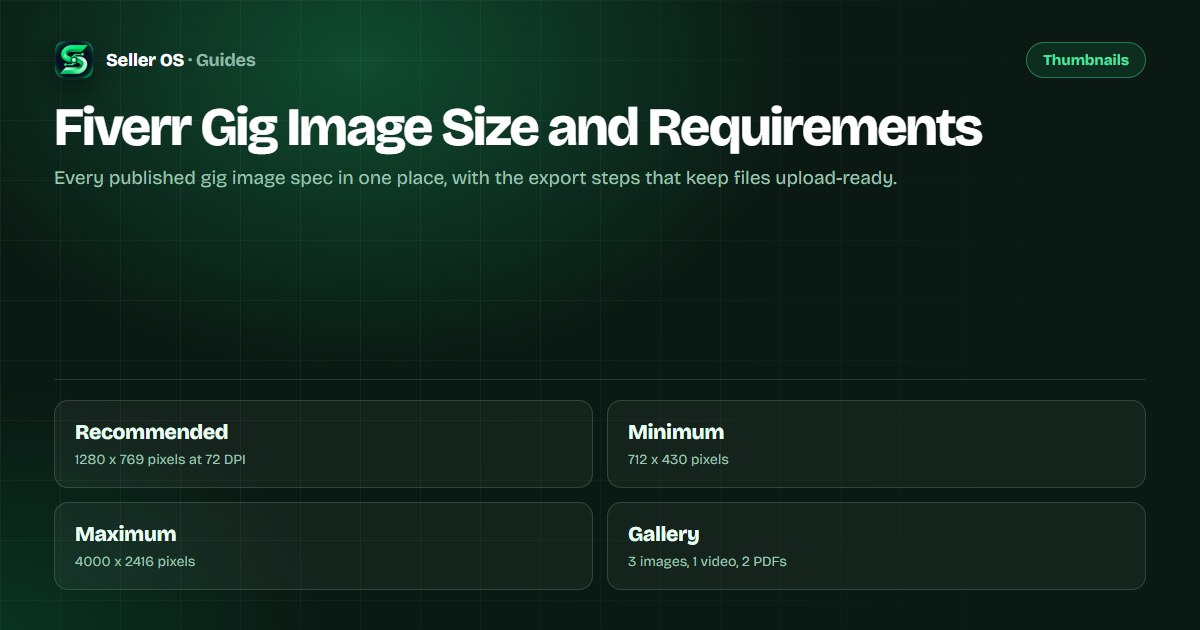
Fiverr's Creating a Gig article recommends a gig image size of 1280 x 769 pixels at 72 DPI, with a minimum of 712 x 430 pixels and a maximum of 4000 x 2416 pixels. Each gallery holds up to three images, one video, and two PDFs, and at least one image is required before the gig can publish.
This guide gathers the specs Fiverr publishes, covers the text and badge rules, walks through an export that stays upload-ready, and flags the spot where Fiverr's own help pages disagree. Choosing the image itself is covered in the thumbnail guide.
Free plan available. Local-first data. Human review on every change.
What a Fiverr gig gallery can hold
Fiverr's gallery article states that each gig gallery holds up to three images, one video, and two PDFs, and a gig needs at least one image to publish. The extra slots are supporting assets: only the first image appears on the gig card, which is why that one carries the click and the others carry the answers.
Plan the three images as a sequence - the card image, a proof image, and a detail image - and treat the video and the PDFs as optional. If an asset is not earning its slot, replace it rather than adding another idea to the same file.
The minimum of one image matters for planning too. If you publish with a single image, that file is doing every job at once: the click, the proof, and the detail. It is usually worth adding the second and third images before you start testing anything else.
Hypothetical example: a logo gig publishes with one image. A buyer who clicks for proof finds an empty gallery, so the decision rests on samples further down the gig page. Adding one proof image with two more case samples answers that question without changing the offer.
The recommended size and the safe range
The recommended dimensions are 1280 x 769 pixels at 72 DPI. Stay above the 712 x 430 minimum and below the 4000 x 2416 maximum, and export at the recommended size so the file is sharp on the card and in the enlarged gig view without being heavier than it needs to be.
A simple check before uploading, hypothetical: export the final image at the recommended size, then view it at half size on your screen to approximate card legibility. If the text holds at that size, the same file will hold in search; if it does not, fix the design before you upload, not after.
Keep the proportions of the recommended canvas if your source is square or very wide. Extending the background to the recommended canvas is safer than uploading an off-size file and hoping the display frame treats it kindly.
Text, logos, and the badge rules
Fiverr's gallery guidance keeps on-image text to no more than 10 words and allows up to five graphics or logos of relevant platforms. Treat those as ceilings rather than targets; a card image with three clear words outperforms one with ten crowded ones.
Badges are not yours to place. Fiverr's gallery article states that badges are added automatically and asks sellers not to add Fiverr logos, ratings, level badges, or other badges to gig images. A painted badge becomes a liability the moment the platform's own badge updates.
How to export an upload-ready image
Fiverr's published articles do not list the accepted image file formats or a maximum file size for gig gallery images, in contrast to the portfolio spec, which names formats and a 50 MB limit. The uploader shows the current accepted types and limits when you add a file, so check there before exporting a batch.
Keep the layered source file with its fonts and assets. If a requirement or the display crop ever changes, rebuilding from a flattened export is slower and lossier than reopening the original canvas and exporting a fresh copy.
Build the canvas - 1280 x 769 pixels at 72 DPI
Respect the range - never below 712 x 430 or above 4000 x 2416 pixels
Check legibility - view the exported file at half size before uploading
Skip the badges - no Fiverr logos, ratings, or level badges on the image
Preview in the editor - confirm the crop, then save the gig
Video and PDF specs, and the conflict
Video has its own requirements, and Fiverr's help pages do not fully agree on the numbers. The Creating a Gig article lists a length of 20 to 60 seconds with a file size under 50 MB, while two other current articles say up to 75 seconds and state the size inconsistently. The listed formats are MP4 and AVI.
The practical approach is to target the shorter figure: a 20-to-60-second video under 50 MB satisfies any of the published readings, and the uploader confirms the current limit at upload time. Approval typically takes a few business days, and a changed video thumbnail can take up to 24 hours to appear.
PDFs are simpler: up to two per gallery, but only the first three pages of each are displayed and they are preview-only, so clients cannot download them. Design the first three pages to carry the full message, and treat the rest of the document as a bonus.
What 72 DPI means for your export
Fiverr's recommended size includes a resolution of 72 DPI, so export at that setting. In practice, the pixel dimensions are what decide how the file displays; DPI is metadata that helps tools agree on physical size. A 1280 x 769 file at 72 DPI meets the recommendation exactly.
If a designer hands you a file measured in inches, convert it to pixels before uploading rather than trusting the DPI label. A document that looks correct at print scale can arrive smaller or larger than the matrix Fiverr expects.
Spec mistakes that blur or block the upload
The most common mistake sellers make is judging the image on the monitor where it was designed. A wide mockup looks sharp in an editing window and gets squeezed to card size in search; what buyers see is the exported file, not the artboard.
Other frequent errors: exporting below the 712 x 430 minimum and then stretching the file, which blurs exactly where clarity matters; cropping a square design into the display frame and losing the edges; and reusing an image whose text was sized for a portfolio page rather than a card.
A quick habit prevents all three: upload a draft, preview it in the gig editor at the sizes Fiverr shows, and only then publish. The preview costs a minute; a blurry card can cost the click.
Where Seller OS helps
Seller OS helps when you are deciding what to fix. The Gig Performance Optimizer reviews a live gig's copy, gallery, and conversion signals against the gig's own performance data and proposes changes, which is useful when the spec is fine but the first image still is not earning clicks. The Gig Builder covers the other direction: it turns a one-line idea or a competitor URL into a structured gig and fills Fiverr's wizard for your review, gallery step included.
Nothing is uploaded or published on its own: you perform the Save and the Publish. The extension is local-first, so its records stay in Chrome local storage instead of a remote account.
Fiverr Gig Image Size and Requirements questions
What is the recommended Fiverr gig image size?
Fiverr's Creating a Gig article recommends 1280 x 769 pixels at 72 DPI, with a minimum of 712 x 430 pixels and a maximum of 4000 x 2416 pixels. Export at the recommended size, and keep a layered source file so future edits do not mean rebuilding the image from scratch.
How many images can a Fiverr gig gallery have?
Up to three images, one video, and two PDFs, according to Fiverr's gallery article. At least one image is required before the gig can publish, and only the first image appears on the gig card in search results, which is why that slot deserves the most attention.
What file type should a Fiverr gig image be?
Fiverr's published pages do not list image file formats for the gig gallery, unlike the portfolio spec, which names JPEG, PNG, and other formats. The uploader shows the accepted formats and current limits when you add a file, so check there before exporting a batch.
Do image requirements differ by category?
Some categories add requirements. Fiverr states that a video is required in the Video and Animation category, and Music and Audio gigs need an audio or video sample to publish. Video specs also differ between Fiverr's own help pages, so confirm the current numbers in the uploader before you record.
Get the file right before you publish
Export at the recommended size, respect the pixel range, and preview the uploaded image before you save.