 Seller OS
Fiverr pause queue vs vacation mode
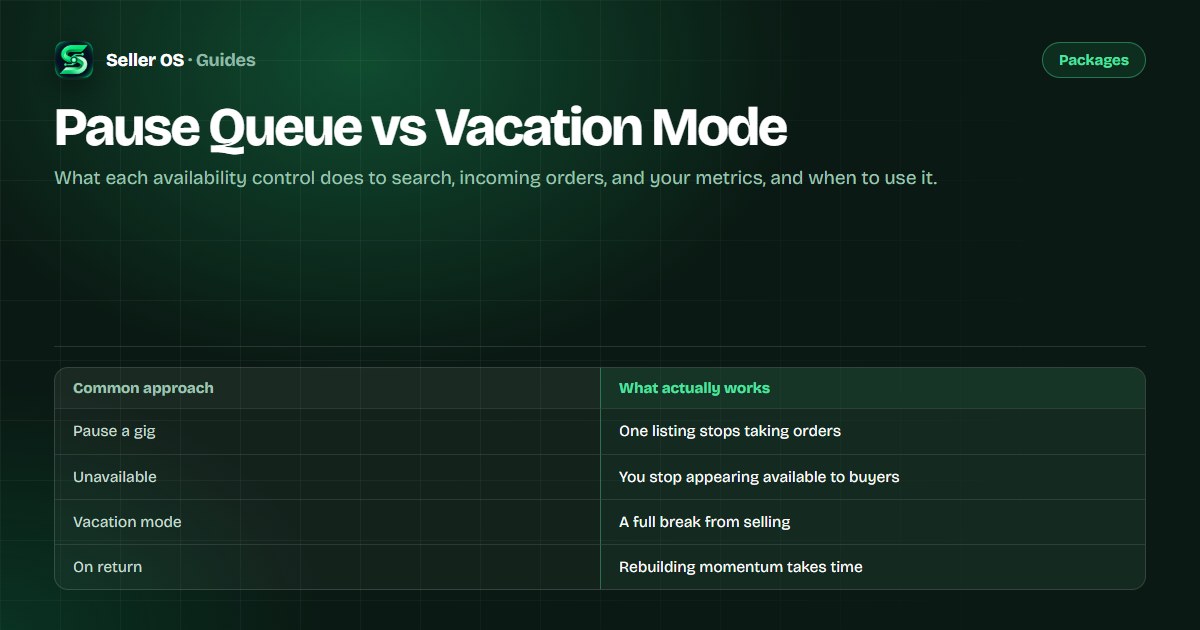
Stepping away from Fiverr is not one action. There are different controls for different reasons, and choosing the wrong one either keeps orders arriving when you cannot take them or hides you from search longer than you needed. The choice between pausing and taking vacation mode comes down to one question: do you want to keep selling while you are busy?
This guide compares the availability controls, what each affects, and which one fits a short overload versus a real break away from the desk.
Free plan available. Local-first data. Human review on every change.
Know the availability controls you have
Fiverr gives sellers more than one way to step back. You can pause an individual gig, and you can take a full break from selling through vacation or unavailable modes. The Fiverr Help Center describes these options and how each one is set (see Fiverr Help Center).
The controls differ in scope. Pausing a gig affects one listing; taking vacation affects you as a seller. Choosing the narrower control when it will do the job keeps the rest of your account working while you handle what pulled you away.
What pausing a gig does
Pausing a gig takes that one listing out of the buying flow while leaving the rest of your account active. It suits a short, specific squeeze: one service is overloaded, or you need a few days to catch up on that type of work without stopping everything else.
Because it is narrow, pausing is easier to reverse. When the gig is active again, the change is small and the rest of your profile, other gigs, and earnings continue uninterrupted.
What vacation mode does
Vacation mode is the wider control. It signals that you are away and not taking new work, which matters when you genuinely cannot respond. A half-available seller who misses deadlines while nominally open damages metrics faster than an honest break.
The trade is momentum. While you are away, you are not accumulating the activity that keeps a listing in front of buyers. On return, expect a ramp while impressions and orders build back, which is why a full break is best reserved for a real absence.
| Question | Pause a gig | Vacation mode |
|---|---|---|
| Scope | One listing | The whole seller account |
| Incoming orders | Other gigs keep selling | New orders stop |
| Search presence | Other listings remain | Availability is withdrawn |
| Best for | A short overload | A real break away |
| On return | Minimal ramp | Visibility rebuilds over time |
What each does to search and metrics
The narrow control protects more than the wide one. While other gigs stay active, they keep collecting the impressions, clicks, and orders that feed your level and response metrics. Pausing one listing costs you that listing's activity only.
Vacation mode pauses that activity across your account. The metric that suffers most is response rate, because there are no new messages to answer while you are away, and the recovery is a climb rather than a switch. That is not a reason to avoid vacation mode; it is a reason to use it only when you actually need it.
Travel versus overload: which to choose
For overload, choose the narrow control. If you are behind on one type of work, pause that gig and keep selling the rest. If you are behind on everything for a few days but still reachable, shorten the delivery times and slow intake rather than disappearing.
For travel or a genuine break, choose vacation mode and set it before you leave, not after a deadline slips. Buyers forgive a planned absence that was visible; they remember a missed delivery on an order that quietly stayed open.
If the break is short and you can still answer messages, a partial approach works: pause the gigs you cannot serve and keep the light ones active. The goal is to match the width of the control to the width of the pause.
Preparing to step away in the right order
The sequence matters as much as the control. Before you change your availability, settle what is already open: deliver what can be delivered, and for anything that cannot finish in time, resolve it or agree an extension rather than leaving it to run past its deadline while you are gone.
Then set the availability control, and set it early enough that buyers see the change before they order. A pause applied the night before a trip is far smoother than one applied after two days of silence, because nobody has been waiting on an answer you could not give.
Leave a clear path back. If you can check messages even occasionally, a note that you are away until a date sets the expectation and protects the response metric from silence. When you return, reactivate, refresh any delivery times that changed, and give the listings a little time to build activity again.
Both controls are reversible, which is the point. The mistake is not stepping away; it is stepping away without deciding, in advance, which control the situation calls for.
Settle open orders
deliver, resolve, or extend.
Set the control
pause a gig, or take vacation.
Note your return date where buyers can see it.
On return, reactivate and refresh delivery times.
Give listings time to rebuild activity.
Where Seller OS helps
Seller OS helps you decide before you change anything, because the choice starts with knowing what is actually in flight. Active orders and their deadlines sit in one local view, so you can see whether a short pause on one gig clears the squeeze or whether a real break is the honest answer.
The extension tracks availability and deadlines but never pauses a gig, switches vacation mode, or contacts a buyer on its own. You make the change in Fiverr, and your orders and notes stay in Chrome local storage on your machine.
Pause Queue vs Vacation Mode questions
What is the difference between pausing a gig and vacation mode?
Pausing affects one listing, so the rest of your account keeps selling and collecting activity. Vacation mode withdraws your availability across the account and stops new orders. Choose the narrow control when a specific gig is the problem, and the wide one only for a genuine break away.
Does vacation mode hurt Fiverr ranking?
While you are away, your listings stop accumulating the activity that keeps them in front of buyers, so expect a ramp when you return rather than an immediate restart. That does not make vacation mode wrong, but it is a reason to reserve it for a real absence and use pausing for short squeezes.
Should I pause a gig or set shorter delivery times?
If you are briefly behind but still working, shortening delivery times and slowing intake keeps you selling. If one type of work is genuinely overloaded, pausing that gig stops new orders for it while the rest of your account continues. Pausing is the cleaner move when the squeeze is specific and short.
What happens to my Fiverr orders when I go on vacation?
Vacation mode stops new orders, but it does not finish the ones already open. Deliver or clearly resolve anything in flight before you leave, because an order that stays open while you are away can run past its deadline. Set the break before you go, not after something slips.
Step away without losing ground.
Pause the listing for a squeeze, take vacation for a real break, and clear open orders before you go.