 Seller OS
Fiverr phone verification problems
Phone verification on Fiverr is a short loop: enter a number, receive an SMS code, enter the code. When it works it takes a minute. When it does not, the failure is usually in the number, the country code, or the carrier rather than in the account itself.
This guide covers how the step works, why the code goes missing, the number rules Fiverr publishes, a recovery sequence that resolves most cases, and the point where support takes over.
Free plan available. Local-first data. Human review on every change.
How the phone-code step works
Fiverr may ask for phone verification on its own or alongside identity verification, and the step exists to confirm that a real person controls the account. The published flow is simple: add a number, request a code, and enter the digits that arrive by text.
The code is time-limited and tied to the request that produced it. That matters, because a common failure is a code that arrives after the entry window has closed, or a second request that invalidates the first. Request one code, wait, and enter it before asking for another.
Why the code does not arrive
A missing text is rarely a Fiverr fault. Delivery depends on the carrier, the number type, and the country, and each of those has a known failure mode.
- A landline or a number that cannot receive SMS at all
- A virtual or internet-based number the carrier does not route texts to
- A country code left off, or a leading zero kept in
- Carrier spam filtering that holds or drops short-code messages
- A full message inbox or a do-not-disturb mode on the phone
- Several codes requested in a row, so the newest invalidates the last
The number rules Fiverr publishes
Fiverr's help center describes which numbers it accepts, and the short version is a real mobile line that can receive text messages. Virtual numbers, some internet-based services, and landlines are commonly reported as unsupported, which is why a number that works for other apps can still fail here.
If you are unsure whether a number qualifies, send yourself an ordinary text from another phone first. A number that receives normal SMS is a better starting point than one that has never carried a message. The accepted rules can change, so read the current help page rather than relying on what worked for someone else.
A step-by-step recovery
Work through these in order. Most missing-code problems are solved by one of the first three steps, before any repeat request is needed.
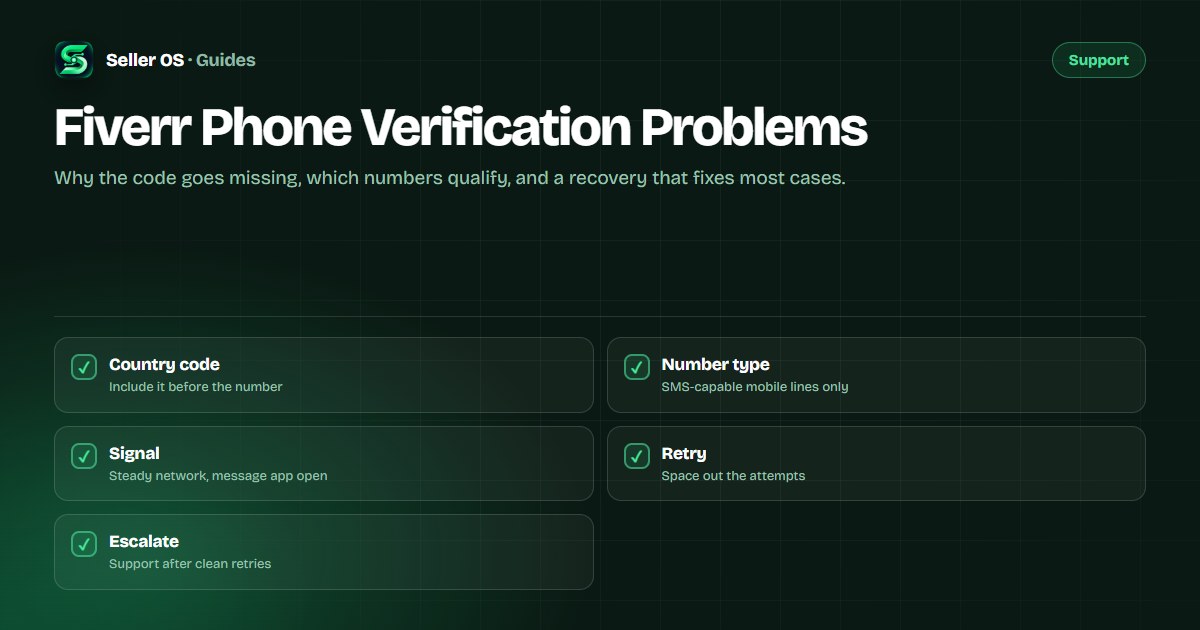
Check the number is an SMS-capable mobile line, not a landline or a virtual number
Re-enter it with the correct country code and no leading zero
Confirm the phone has signal, storage space, and its message app open
Request one code and wait the full delivery window before asking again
If it still does not arrive, switch to a different qualifying number and retry
Repeat-request timing, and the loop that traps people
The loop is what traps people: no code, request another, no code, request another, and each request resets the clock on the last. Try the carrier fixes first and only then request one more, after the stated wait. Fiverr does not publish a fixed number of attempts, so protect each try by making the setup right.
If you are traveling, roaming can delay short-code texts, and Wi-Fi calling sometimes routes them differently from a normal carrier message. Switching back to the network the number is registered to is often the fastest fix.
When to escalate
Escalation is for a number that clearly qualifies and still receives nothing after clean attempts. At that point, open a ticket through the normal support path and describe the number type, your country, and the steps you tried. If you cannot sign in at all, the published fallback is to email support@fiverr.com from the email registered to the account.
Do not submit the same request from several numbers at once; that reads as noise and does not get a text delivered. One ticket with the technical detail is the stronger case, and the contact guide covers the routes.
Where Seller OS helps
Phone verification is a moment of friction, and Seller OS keeps the work behind it from stalling. Client records, order deadlines, and unread messages stay in one local workspace, so a verification detour does not cost you a delivery window.
The extension never asks for your phone number and cannot receive codes. It stores only what you enter, locally in Chrome, and a person performs every step.
Fiverr Phone Verification Problems questions
Why am I not receiving the Fiverr verification code?
Delivery depends on the carrier and the number type. Landlines, some virtual and internet-based numbers, and lines with full inboxes or do-not-disturb can all drop short-code texts. A missing country code or a kept leading zero also stops delivery. Try a different qualifying mobile number if the first one receives nothing.
Does Fiverr accept virtual or VOIP numbers?
Fiverr's published guidance describes the numbers it accepts, and virtual and internet-based services are commonly reported as unsupported for phone verification. A real mobile line that can receive ordinary texts is the safer choice. If your number works for other apps but not here, the number type is the likely reason.
How often can I request a new Fiverr verification code?
There is no published fixed cap on attempts, but each request can invalidate the previous code. Request one code, wait the full delivery window, and only then request one more. Requesting codes in a rapid loop resets the clock each time and rarely delivers a usable message, so fix the number and carrier setup first.
What should I do if phone verification keeps failing?
Open one support ticket through the normal path and describe the number type, your country, and the exact steps you tried. Do not submit the same request from several numbers, because that adds noise without delivering a text. If you cannot sign in, email support@fiverr.com from the address registered to the account.
Break the repeat-request loop.
Check the number type and country code, request one code, and escalate only after clean attempts.