 Seller OS
Fiverr buyer is unresponsive: what should you do?
Silence from a buyer on an active order is not the same as being ghosted before one. The order exists, which means Fiverr's clocks are running: requirements cancel after 14 days, deliveries complete on their own, and a review extension can keep an order in Delivered. Your job is to keep your side moving inside those windows instead of waiting for an answer that may never come.
This guide walks through silence at each stage of an active order, what to deliver when you have no confirmation, the records to keep, and when to use mutual cancellation or contact support.
Free plan available. Local-first data. Human review on every change.
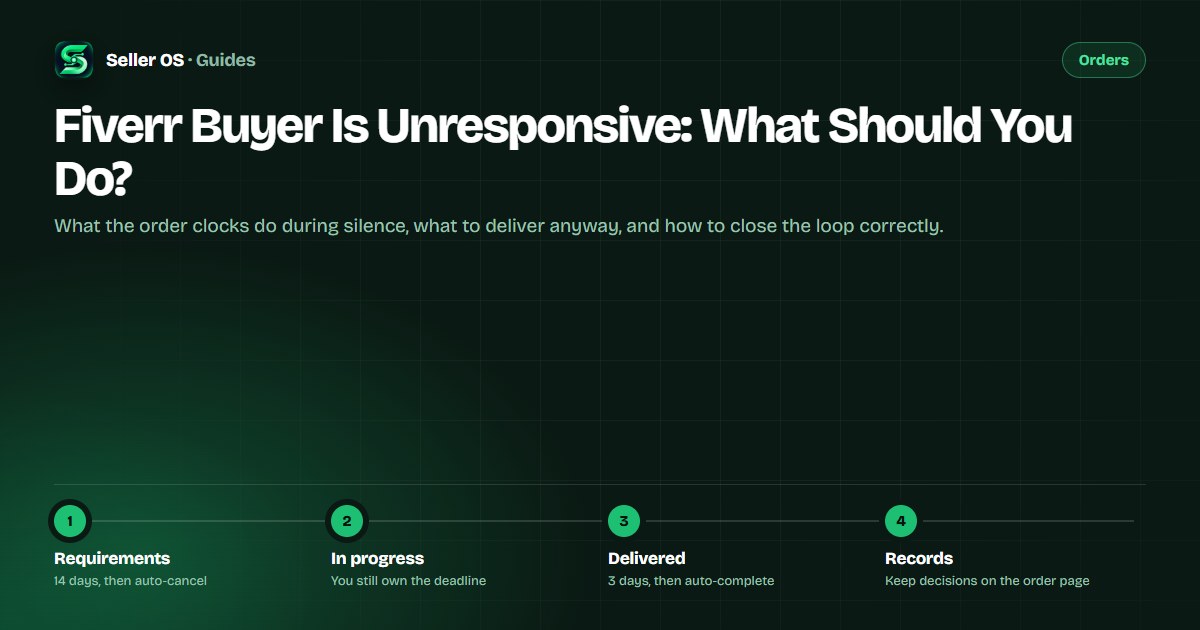
Find the stage before you send anything
In-order silence lands in one of four places: waiting for requirements, in progress, delivered, or in revision. Each one has a different clock and a different best move, and the first mistake is treating a delivered order like a stalled one. Check the order page, note the status and the date, then act on that stage alone.
It also helps to separate your buyer's silence from your own obligations. Fiverr treats being unresponsive toward clients as a policy matter for sellers — its policy pages describe an account warning for not replying to clients for more than 24 hours — so going quiet in return is not a strategy. Keep replying on time even when the buyer does not.
Silence while the order waits for requirements
This is the safest silence of the four, mechanically. Fiverr states that if the client does not submit requirements within 14 days of the order creation date, and you do not skip them, the order is automatically canceled and the buyer is refunded to their Fiverr balance. Nothing you do in that window can force-cancel the order, and nothing obligates you to start work without a brief.
Your move is a short, useful message early — day two or three, not day thirteen. Offer a checklist of what you need, an offer to work from material that already exists, or a proposal to skip requirements if the brief is clear enough. Do not wait until day thirteen to discover the buyer is gone.
Example, labeled hypothetical: 'Hi Maya, the order is set to start. To begin, I need the brand file and the two example videos you mentioned. If it is easier, I can work from the folder you already shared, or we can skip requirements and I will use the brief in your order notes.' If the answer never comes, the order cancels itself, and Fiverr states unresponsive clients do not negatively impact your Success Score.
Silence while the work is in progress
In-progress silence usually blocks one input: a file, an approval, or a decision between two options. Send one message that makes replying easy, then give the decision a default and a date. Example, labeled hypothetical: 'I have the layout ready and need the final logo file to start rendering. I have Thursday reserved; if I do not hear back by Wednesday, I will use the version in your brand folder and we can swap it later at no extra cost.'
Then deliver. Your deadline does not pause because the buyer is quiet; if the date is at risk, the extension mechanics are on your side, and the order extension guide explains the timing. If an input truly never arrives and the work cannot proceed without it, say so in writing on the order page, propose a mutual cancellation through the Resolution Center, and close the order deliberately rather than going late by default.
Silence after delivery, and what the clock does
Once you deliver, the buyer has three days to accept, request revisions, or extend the review period, and an extension of up to five days can be used more than once. If nothing happens, the order completes automatically: three days for standard and hourly orders, eight for milestone orders, and fourteen for gigs that require shipping.
What not to do: send three reminders, re-deliver without being asked, or cancel a working order out of impatience. The order completes on its own, and completing is the outcome you want. What to do: send one delivery message that names the files and what to check, then let the clock work.
An auto-completed order is not an approval, so the buyer may return later with notes; the post-completion request guide covers how to handle that. In revision, a re-delivery returns the work to the client's three-day review window, and the Fiverr revisions guide explains the cycle.
Document your side while it is quiet
Support, if you ever need it, will read the order page before your memory. Keep every decision, assumption, and request in the order thread rather than moving to email or another app; Fiverr's rules require work and payment to stay on the platform anyway. When you proceed on an assumption, write the assumption down with the date and the default you chose.
A simple habit covers it: after each silent milestone, post a three-line update — what is done, what is waiting, and what happens next. Example log: 'Oct 2: layout done. Waiting on the logo file since Sep 28. If no file arrives by Oct 5, I will proceed with the version in the brand folder.' That message turns a vague silence into a documented plan.
When to cancel, and when to involve support
Fiverr's guidance on cancellations for a client who is unresponsive, especially from the start, is a mutual cancellation through the Resolution Center. You cannot force-cancel an order; the buyer must approve, or the request is automatically canceled after 48 hours. That path closes the order cleanly when requirements never arrive or the work cannot start, and Fiverr states that unresponsive clients do not negatively impact your Success Score.
Understand the trade-off: Fiverr's cancellations page lists orders where the seller submits the cancellation request among the scenarios that affect Order Completion Rate, and very-late force-cancellations affect it too. So exhaust the documented stages first — requirements auto-cancel and deliveries auto-complete — and treat mutual cancellation as the route for a stalled order that can reach neither. If an active order cannot move at all, Customer Support is the escalation path; completed orders cannot use the Resolution Center at all.
“If your client is unresponsive, you can initiate a mutual cancellation through the Resolution Center on the order page.”
— Fiverr Help Center, How cancellations work for freelancers, September 2026
The mistakes that make silence worse
The most common mistake is waiting for an answer the mechanics do not require. A delivered order does not need the buyer's blessing to complete, and a requirements-stage order does not need your rescue to cancel. Check the clock; if the platform path is already running, let it run.
The second is starting work without requirements because the brief seems clear enough, then discovering the scope was never agreed. The third is letting reminders pile up: several unanswered check-ins read as pressure and damage the professional tone you may need if the order reaches support. One clear message per stage, with a default and a date, is the whole system.
Where Seller OS helps
Seller OS cannot make a buyer answer, but it keeps the silence from swallowing the schedule. On Pro, the deadline guard watches active orders and the unread message monitor flags inbox activity while Chrome is open, so a quiet thread shows up as a signal instead of a surprise. The inbox assistant drafts each stage message — the requirements nudge, the conditional input request, the delivery note — and you review, edit, and send it yourself.
Client records keep the timeline locally: what was sent, when, and what you decided to assume. That history is the same one support or a future buyer conversation will need, without depending on memory. Every action stays manual; nothing on the platform is changed for you.

Fiverr Buyer Is Unresponsive questions
Should I keep messaging a Fiverr buyer who doesn't respond?
No. Send one clear message per stage, with a specific ask, a default decision, and a date. Then let the order mechanics run: requirements-stage orders auto-cancel after 14 days, and delivered orders auto-complete after 3, 8, or 14 days depending on type. Repeated reminders do not speed either clock and can hurt the tone of the record.
Does an unresponsive buyer affect my Fiverr Success Score?
Fiverr states that unresponsive clients do not negatively impact your Success Score and that the leveling system accounts for these scenarios. Your obligations remain: deliver on time, keep replying within the response window, and document decisions on the order page. Fiverr treats a seller's own lack of communication as a policy matter, so do not go quiet in return.
Can I cancel an order when the buyer won't respond?
You cannot force-cancel. For a buyer who is unresponsive from the start, Fiverr's guidance is a mutual cancellation through the Resolution Center; the buyer must approve, or the request auto-cancels after 48 hours. Before requirements are submitted the client can cancel directly. Note that seller-submitted cancellations are listed among the scenarios that affect Order Completion Rate.
What should I deliver when the buyer never replies?
Deliver what the agreed scope supports, on time, with a note naming the files and the assumptions you made. For blocked inputs, send one conditional message, set a default, and proceed. If the work genuinely cannot start without the missing input, use the documented path — skip requirements if the brief is sufficient, or request a mutual cancellation — rather than delivering late.
Let the clocks finish what silence started.
Check the stage, send one clear message, deliver what was agreed, and document the rest.