 Seller OS
Fiverr profile not getting views: where to look first
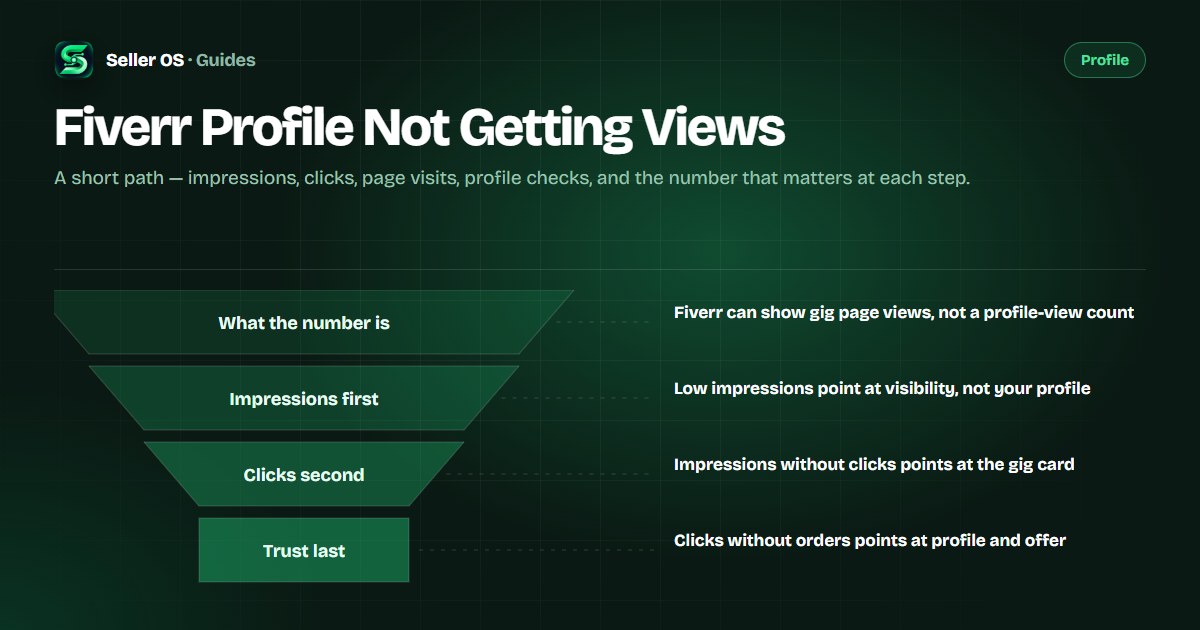
If your Fiverr profile is not getting views, the number that is actually missing is almost always gig traffic. Fiverr does not publish a profile-views counter in its standard analytics, so the practical reading comes from the gig statistics that feed the profile: impressions first, then clicks, then orders.
This guide gives you the checks in order, what each stage rules out, and how to tell a traffic problem from a trust problem. It also names the limit honestly: none of these numbers tells you exactly why Fiverr ranked a gig where it did.
Free plan available. Local-first data. Human review on every change.
What a profile view is on Fiverr
Fiverr's standard analytics does not publish a profile-views counter. The "views" figure that the mobile app documents is defined as page views on the actual gig page, not on your profile. So when a seller says the profile is not getting views, the observable data is really the traffic around the gigs that feed it.
Profile visits come after gig traffic. A buyer usually reaches your profile after a click: from a gig page, from a review shown on both the gig page and your profile, from a portfolio item placed on those surfaces, or from a profession page. If almost nobody reaches the profile, the first question is not about the profile at all.
The checks, in order, before you edit
Order matters because each number rules out a different cause. Start with the gig's own statistics — impressions, clicks, orders, conversion rate — and move one stage at a time. Editing your bio before you know which stage is failing moves the wrong variable and teaches you almost nothing.
Use a desktop browser for the fuller data. Fiverr's help center describes per-gig statistics there, displayed for the past 30 days by default, while the app shows a shorter seven-day set with impressions, clicks, views, and conversion.
Open one gig's statistics
go to My Business, then Gigs, click the gig title, and read the last 30 days.
Note impressions first
this is the top of the path and it decides whether anything below can happen at all.
Then read clicks
impressions without clicks point at the gig card, not at your profile.
Then read orders
clicks without orders point at the gig page, the offer, and the profile behind it.
Only then open your profile
the bio, skills, portfolio, response time, and certifications are the trust layer a click lands on.
Check one: your impressions are low
If impressions are flat, Fiverr is not surfacing the gig. That is a visibility problem before it is a profile problem, and it is the most common reason a profile looks dead. The levers live in the gig itself: the phrase in the title, the five tags, the category, and how crowded the phrases you target are.
A hypothetical example makes the order obvious. One seller has two gigs: the first shows 1,400 impressions over 30 days, the second shows 120. The quiet gig needs keyword and category work first, and a rewritten profile will not change a listing that is never shown. See Fiverr gig not getting impressions and new gig not ranking for that work.
| Stage | Hypothetical reading | What it rules out |
|---|---|---|
| Impressions | 120 in 30 days | Title, tags, and category are not surfacing the gig |
| Clicks | 6 clicks from 1,400 impressions | Traffic arrives, but the gig card is not earning the click |
| Orders | 0 orders from 12 clicks | Clicks arrive, so trust, scope, or offer is the blocker |
Check two: impressions without clicks
If impressions are healthy but clicks are thin, the gig card is losing the comparison. The card carries your thumbnail, title, and level badge, and those are the elements a buyer scans in a list of near-identical services. This stage is about the promise and the image, not about the profile.
Compare your card with the three gigs above yours for one keyword. If they show a person, a before-and-after, or a readable outcome and yours shows a generic mockup, that difference is the finding. Impressions but no clicks goes deeper on this stage.
Check three: the click lands and leaves
A click without an order means a buyer considered you and kept looking. At that point the buyer is checking the profile contents Fiverr lists for clients: location, languages, response times, bio, skills, and certifications, plus the reviews and portfolio work shown on your profile and gig pages.
Read the profile as the last mile of the gig. Does the bio name who you help and with what, do the first pinned portfolio projects match the gig promise, and does your response time signal that you are around? Profile optimization covers the fields; profile vs gig explains which surface does what.
Mistakes that keep the diagnosis stuck
The first mistake is treating one quiet week as a verdict. Fiverr's guidance for keyword updates is to allow at least 30 days before judging impact, and a traffic reading deserves the same patience: a real comparison needs a previous period, not a feeling.
The second is editing the profile while the gig has a traffic problem. The third is forgetting account states. A gig that is paused, under review, denied, or removed shows no traffic at all, and that is a different diagnosis: start with paused gigs or denied gigs, and if the gig is live and losing a comparison, work on standing out instead.
- Rewriting the bio before checking gig impressions
- Judging a change before a full comparison window has passed
- Watching the app's seven-day view and ignoring the desktop window
- Assuming a quiet gig is a profile problem when it may be an account state
Where Seller OS helps
Seller OS keeps the traffic side of this diagnosis visible without a spreadsheet. Keyword Rank records a local history of positions for the phrases your gigs target, so you can see whether impressions fell alongside a position drop or while positions held steady; the Gig Performance Optimizer reviews a live gig's copy, gallery, and conversion signals against that gig's own performance data and proposes specific edits.
It does not read Fiverr's internal analytics, and it cannot tell you why Fiverr ordered results the way it did. What it does is keep the two questions — is this a traffic problem or a trust problem — easy to answer from one place, with every proposed change waiting for your review.
Fiverr Profile Not Getting Views questions
Does Fiverr show how many people viewed my profile?
Fiverr's standard analytics does not publish a profile-views counter. The views figure documented for the mobile app is defined as page views on the actual gig page. In practice, sellers read profile interest through the gig stats that lead there: impressions, clicks, orders, and the messages and briefs that follow.
Why did my profile views drop suddenly?
Profile visits follow gig traffic, so a sudden drop usually starts one step earlier: fewer impressions or fewer clicks on the gigs that feed the profile. Check the same window across every gig, compare it with the previous period, and rule out a paused gig or a review state before you touch your bio.
Will editing my profile bring more views?
Profile edits do not create impressions. They change what happens after a click: whether a buyer trusts the bio, the portfolio, and the response time enough to order. Fix the stage that is actually failing first, then give profile work something to convert once clicks are arriving.
How long should I wait before judging a change?
Fiverr's guidance for keyword updates is to allow at least 30 days before reviewing impact, and that is a reasonable window for this diagnosis too. Make one change, keep the previous period as your comparison, and avoid stacking edits while the data is still settling.
Find where the traffic stops
Open your gig statistics, run the checks in order, and fix the stage that is actually broken.